
Apog Labs2026Survival, Simulation
11.7GBBuild 26309985Updated 29 days ago
About ATMOSFAR
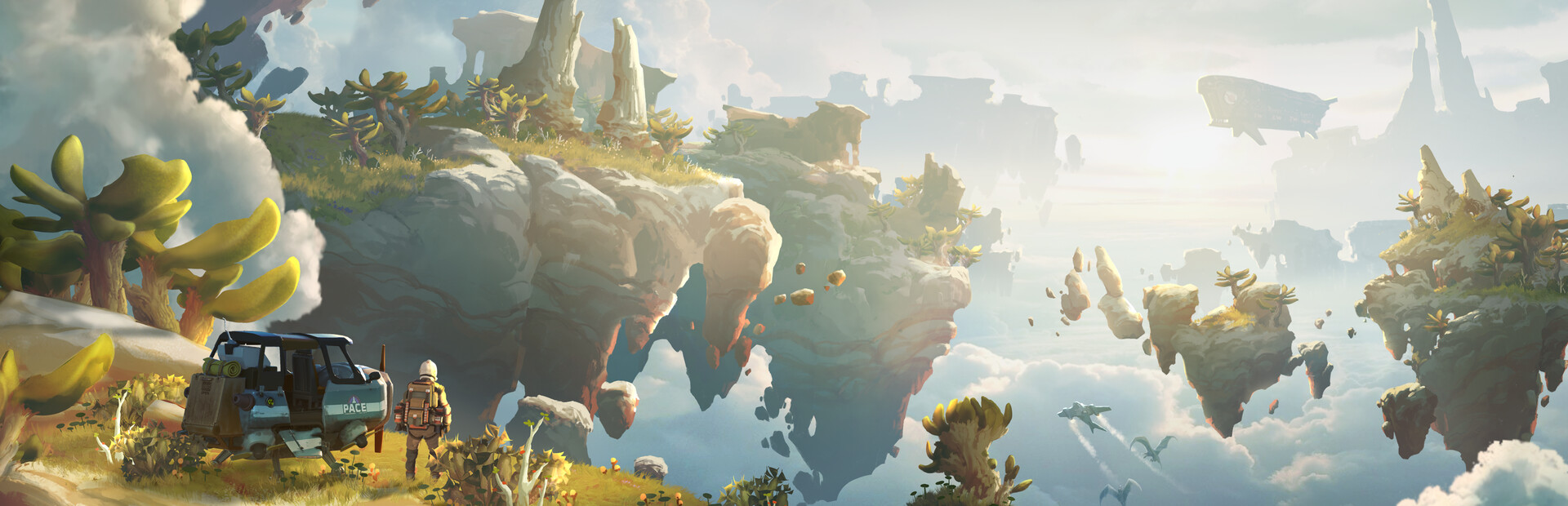
Uncover the fate of humanity's final outpost as you survive and explore a thrilling world of floating islands. Brave the skies on your own or assemble a squadron of friends, and scavenge scrap to engineer and upgrade flying vessels, bringing your airship along for the journey.
Uncover the fate of humanity's final outpost as you survive and explore a thrilling world of floating islands. Brave the skies on your own or assemble a squadron of friends, and scavenge scrap to engineer and upgrade flying vessels, bringing your airship along for the journey.
An Open World
Travel through an open world of floating islands and aerial wonders. Discover how this unique environment has shaped the creatures and biomes that inhabit it as you navigate the skies and level up your piloting skills.

The Wasp
The Wasp is an agile vessel that can both zip through the sky and hover in place. Available in several different classes, each type of Wasp has its own unique appearance, abilities, and aerodynamics.
Deploy a portable camp with the Utility Wasp, airlift heavy scrap with the Hauler Wasp, or stun your enemies with the Striker Wasp. It's all about bringing the right Wasp for the job.
The Wasps you rely on also rely on you. Make sure they're fueled, well-maintained, and repaired when needed so you're always ready to go when things get dangerous. Upgrade engine parts, hover modules, or entire hulls to get your preferred configuration. Give your Wasp a new paint job to make it look its best.
The Cloud Cruiser
The Cloud Cruiser is your mobile base: a buildable, fully customizable airship capable of housing everything important to you. Bring your Wasps and fuel supplies aboard by building Wasp pads and fuel tanks, furnish a lounge area to your liking, and pilot the airship yourself from the helm. Expand your Cloud Cruiser as you explore planet Tycos, island by island, adding new sections whenever you need to support increasingly demanding expeditions.
Explore, Build, and Survive
Live off the land by extracting scrap, processing minerals, and collecting organic materials. Craft items and manufacture resources, cook food, and research artifacts to gain knowledge about new things to create.
Your backpack houses a life support system that provides the power you and your tools need. Build camp equipment or Cloud Cruiser modules to expand your reach across planet Tycos.
Investigate the events surrounding the collapse of your old colony and uncover the promise of planet Tycos as humanity's final refuge.

Band of Vagabonds
You don't need to venture onto planet Tycos alone! Up to four players can camp out, hitch a ride on a friend's Wasp, or fly in formation. Work together to build and operate your shared Cloud Cruiser and experience the odyssey together.

Deadly Beautiful Flora and Fauna
Take cover when day turns to night or when calm weather gives way to unfavorable winds. From howling jet streams to thunderous rainstorms, the treacherous weather on planet Tycos will require you to master your piloting skills as you traverse the skies.
Get your bearings on your new home planet and investigate its alien characteristics. Discover a wealth of strange plants, explore lush biomes, and defend against threatening creatures and drones.
From the store page, unedited. May contain spoilers.
This release
Reviews and playtime
Mostly Positive
70% of 746
The game
Genres and features
How to install ATMOSFAR
Pre-installed, so there is no setup wizard. Follow these in order.
- 01
Create a games folder
Make a folder like C:\Games\ and keep every game in it. Avoid Program Files, Downloads and the Desktop.
- 02
Exclude it from Windows Defender
Defender often deletes cracked files by mistake while they extract. Add C:\Games\ as an excluded folder:
Windows Security -> Virus & threat protection -> Manage settings -> Exclusions -> Add an exclusion -> Folder
- 03
Download into C:\Games\
Save the archive straight into that folder. This release is one 11.7GB file.
- 04
Extract it there
Use 7-Zip or WinRAR. Keep about 25.7 GB free while it unpacks.
- One file
- Right-click it -> Extract here.
- Several parts
- Extract only part1 (or .001). The other parts are read automatically.
- 05
Open README.html
It is inside the extracted folder and explains how to start the game.
Still stuck? Read the install help
Download
Set up your games folder and the Defender exclusion before you extract. The Install tab has the steps.
FileDitch
The whole game in one file
We don't accept fix requests when only one host is down. Please use another mirror above. Links broken? Let us know.
We never password-protect files or hide installers. If a page asks for a password or payment, that is the host's ad, not us. See our safety guide.
System requirements
- Min
- Windows 10 (64-bit)
- Rec
- Windows 11 (64-bit)
- Min
- Intel Core i5-7500 (3.4 GHz 4 Core) or AMD Ryzen 5 1500X (3.5 GHz 4 Core)
- Rec
- Intel Core i7-14700K (5.6 GHz 8 Core) or AMD Ryzen 7 7800X3D (4.2 GHz 8 Core)
- Min
- 8 GB RAM
- Rec
- 16 GB RAM
- Min
- Nvidia GeForce RTX 2070 or AMD Radeon RX 6700 XT
- Rec
- Nvidia GeForce RTX 4070 or AMD Radeon RX 7800 XT
- Min
- 25 GB available space
- Rec
- 50 GB available space
Version 12
Any
Internet connection required for multiplayer.
These are the developer's listed requirements and may not be 100% accurate. If your specs fall below the minimum, try the game anyway; many games run fine below the listed requirements. When in doubt, check YouTube for performance benchmarks.