
Bento Blocks
SOMETIMES LIMITED2026Puzzle, Casual
162.9MBBuild 23096256Updated 52 days ago
About Bento Blocks
Craft delicious lunch boxes in this cozy-yet-challenging ingredient-cutting puzzle game.
WISHLIST NOW & JOIN THE DISCORD <3
About the Game
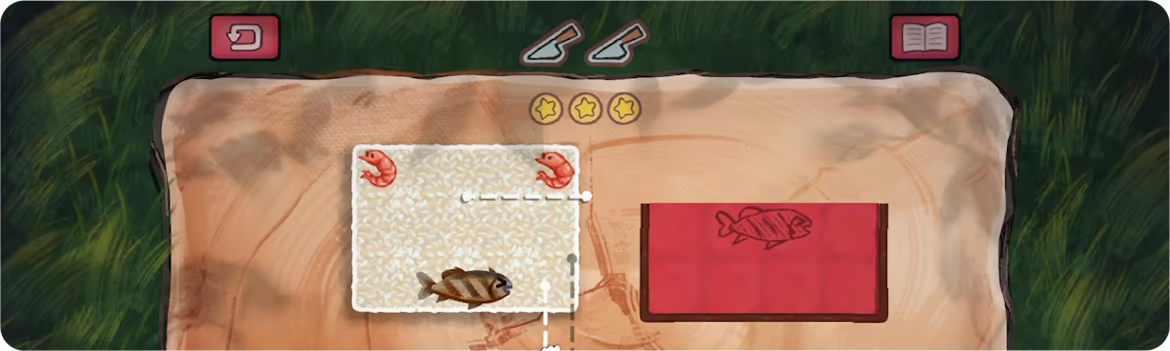
Bento Blocks is a cozy puzzle game about slicing and packing ingredients neatly into lunch boxes using the fewest cuts.

...

Test your culinary creativity by exploring over 180 hand-crafted levels, each with its own quirky twist and satisfying solution.

...

Play how you like! Unwind with gentle music, bite-sized challenges and calming visuals. No pressure, no timer, play the game at your own pace.

...

Fewer cuts mean more stars for your recipe book... but it might not be so shrimple after all.
...
FEATURES
Pack delicious ingredients into a variety of quirky bento boxes.
The fewer slices you make, the more stars you'll earn.
Play through 180+ hand-crafted puzzles and unlock new scenery as you progress.
Unwind with live-recorded music and soothing hand-painted art.
No pressure and no timers -- play entirely at your own pace.

Thank you for reading! Support us by wish-listing the game and join our cozy community on Discord!
From the store page, unedited. May contain spoilers.
This release
Reviews and playtime
Very Positive
97% of 440
The game
Genres and features
How to install Bento Blocks
Pre-installed, so there is no setup wizard. Follow these in order.
- 01
Create a games folder
Make a folder like C:\Games\ and keep every game in it. Avoid Program Files, Downloads and the Desktop.
- 02
Exclude it from Windows Defender
Defender often deletes cracked files by mistake while they extract. Add C:\Games\ as an excluded folder:
Windows Security -> Virus & threat protection -> Manage settings -> Exclusions -> Add an exclusion -> Folder
- 03
Download into C:\Games\
Save the archive straight into that folder. This release is one 162.9MB file.
- 04
Extract it there
Use 7-Zip or WinRAR. Keep about 358.4 MB free while it unpacks.
- One file
- Right-click it -> Extract here.
- Several parts
- Extract only part1 (or .001). The other parts are read automatically.
- 05
Open README.html
It is inside the extracted folder and explains how to start the game.
Still stuck? Read the install help
Download
Set up your games folder and the Defender exclusion before you extract. The Install tab has the steps.
FileDitch
The whole game in one file
VikingFile
The whole game in one file
Gofile (legacy)
The whole game in one file
We don't accept fix requests when only one host is down. Please use another mirror above. Links broken? Let us know.
We never password-protect files or hide installers. If a page asks for a password or payment, that is the host's ad, not us. See our safety guide.
System requirements
- Min
- 1.8 GHz or faster processor
- Rec
- 2.8 GHz or faster processor
- Min
- 2 GB RAM
- Rec
- 3 GB RAM
Windows 7 (SP1+) and Windows 10
Direct X 11.0 compatible video card
Version 11
300 MB available space
Any
These are the developer's listed requirements and may not be 100% accurate. If your specs fall below the minimum, try the game anyway; many games run fine below the listed requirements. When in doubt, check YouTube for performance benchmarks.