
Blippo+
YACHT2025Casual, FMV
7.3GBBuild 24136980Updated 96 days ago
About Blippo+
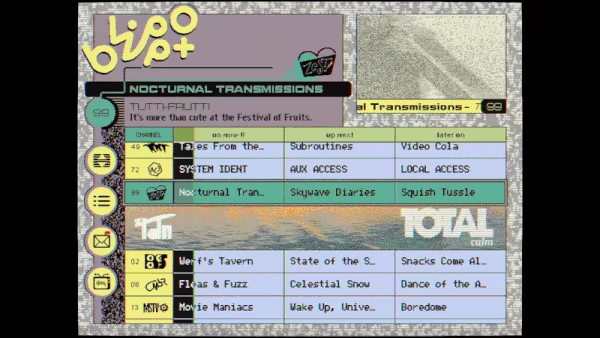
Blippo+ is a live-action, off-cable TV simulator. Channel-surf the stars and discover the staticky, radical world of Planet Blip through its soaps, sitcoms, news, weather, and talk shows. But don’t touch that remote—everything’s about to get bent.
Congratulations! Blippo+ is now available in your area.
Blippo+ is a live-action, new wave, off-cable TV simulator. Channel-surf the stars and discover the staticky, radical world of Planet Blip through its soaps, sitcoms, news, weather, and talk shows. But don’t touch that remote—because everything’s about to get bent.
Planet Blip is brought to life through a cast of lovable characters, vibrant costumes and makeup, original music, extensive lore, and writing that pays homage to the offbeat, idiosyncratic, and often-forgotten margins of TV history, from pirate television and cable access to public broadcasting and video art. Whether you’re a punk, new waver, sproinger or a bender: there’s something for you on Blippo+.
Features:
Channel-surf your way through a wide variety of funny, freaky, and wholly original live-action programs on the Blippo+ Electronic Program Guide!
Fall in love with a diverse cast of alien TV personalities, from cloned soap opera stars and spooky raconteurs to mad professors, quizmasters, scientists, and action sheroes.
Immersive yourself in Blippo+ to unlock data packettes, update the Electronic Program Guide with new episodes and messages, and piece together the planet-shaking story unfolding between the channels.
Expand your knowledge of Blippian culture by lurking the Femtofax “videotext” forums.
Fiddle with extensive TV settings to personalize your Blippo+ experience.
Enjoy a genre-spanning original soundtrack by Grammy-nominated composers Rob Kieswetter and Jona Bechtolt of YACHT.
From the store page, unedited. May contain spoilers.
This release
Reviews and playtime
Very Positive
95% of 427
The game
Genres and features

How to install Blippo+
Pre-installed, so there is no setup wizard. Follow these in order.
- 01
Create a games folder
Make a folder like C:\Games\ and keep every game in it. Avoid Program Files, Downloads and the Desktop.
- 02
Exclude it from Windows Defender
Defender often deletes cracked files by mistake while they extract. Add C:\Games\ as an excluded folder:
Windows Security -> Virus & threat protection -> Manage settings -> Exclusions -> Add an exclusion -> Folder
- 03
Download into C:\Games\
Save the archive straight into that folder. This release is one 7.3GB file.
- 04
Extract it there
Use 7-Zip or WinRAR. Keep about 16.1 GB free while it unpacks.
- One file
- Right-click it -> Extract here.
- Several parts
- Extract only part1 (or .001). The other parts are read automatically.
- 05
Open README.html
It is inside the extracted folder and explains how to start the game.
Still stuck? Read the install help
Download
Set up your games folder and the Defender exclusion before you extract. The Install tab has the steps.
FileDitch
The whole game in one file
0807
The whole game in one file
FileQ
The whole game in one file
Gofile (legacy)
The whole game in one file
We don't accept fix requests when only one host is down. Please use another mirror above. Links broken? Let us know.
We never password-protect files or hide installers. If a page asks for a password or payment, that is the host's ad, not us. See our safety guide.
System requirements
- Min
- Windows 10 version 21H1 (64-bit)
- Rec
- Windows 11 version 24H2 (64-bit)
- Min
- 4 GB RAM
- Rec
- 8 GB RAM
- Min
- Integrated graphics
- Rec
- Dedicated graphics
- Min
- Version 10
- Rec
- Version 11
x86-64 compatible
8 GB available space
These are the developer's listed requirements and may not be 100% accurate. If your specs fall below the minimum, try the game anyway; many games run fine below the listed requirements. When in doubt, check YouTube for performance benchmarks.