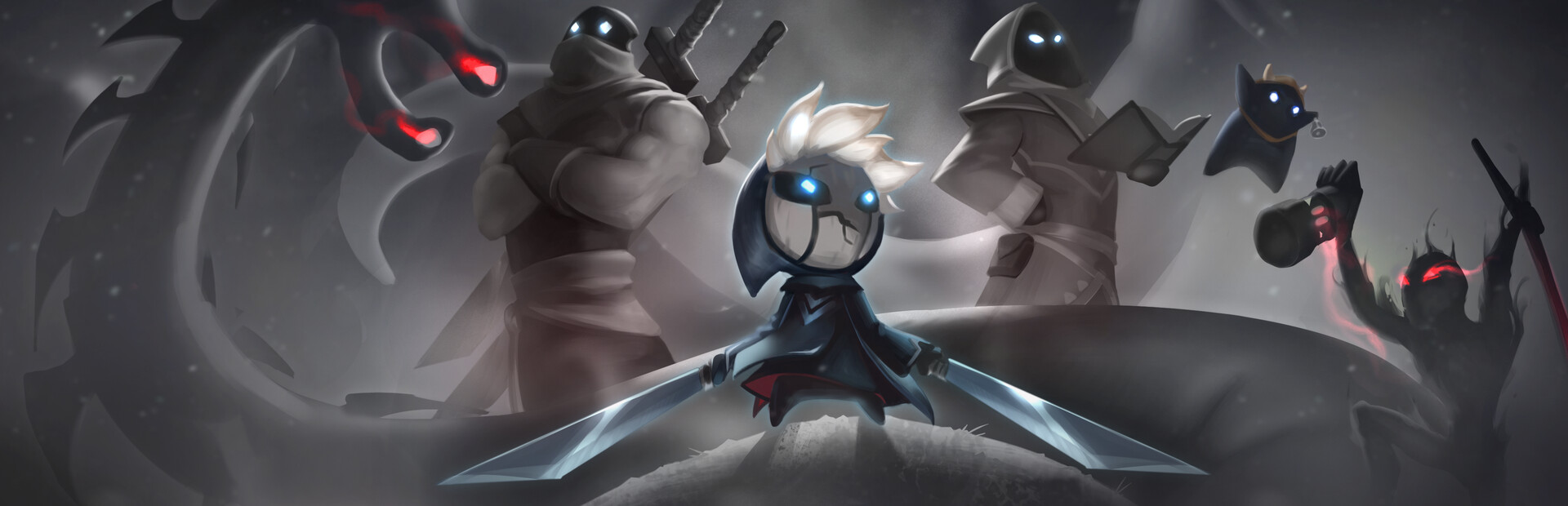
Blue Fire
Robi Studios2021Metroidvania, Platformer
3.9 GBBuild 9611247Updated 158 days ago
About Blue Fire
Explore the fallen world of Penumbra in this precision 3D metroidvania platformer. Slash fierce enemies, conquer deadly traps, uncover ancient temples, and master fast, fluid movement across challenging platforming gauntlets in your quest to restore a fallen kingdom.

Enter the fallen kingdom of Penumbra, where only mastery of movement and combat will guide you through its mysterious ruins. Blue Fire is a 3D metroidvania platformer blending fast-paced combat, challenging precision platforming, and deep exploration.

Precision Platforming & Movement
Master fluid, high-speed movement to navigate deadly traps, complex platforming gauntlets, and traversal challenges that demand precision, timing, and skill.

Fast-Paced Combat & Fierce Bosses
Face dangerous enemies with unique fighting styles in intense combat encounters. Strike, dodge, and slash while testing your skills against powerful bosses, the deadly knights of the darkness.

The Voids: Ultimate Platforming Challenges
Discover mysterious Void entrances hidden across Penumbra. Enter surreal platforming trials that push your movement skills to the limit, offering great rewards for those who survive.

Progression & Upgrades
Claim powerful swords, hidden spirits, and valuable loot. Upgrade your gear, unlock new abilities, and customize your build to face ever-deadlier foes.

Blue Fire delivers a deadly yet rewarding adventure where every jump, slash, and dodge counts. The mysterious world of Penumbra awaits.
From the store page, unedited. May contain spoilers.
This release
Reviews and playtime
Very Positive
83% of 1,926
The game
Genres and features
MetroidvaniaPlatformerHack and SlashSouls-likeActionAdventure


How to install Blue Fire
Pre-installed, so there is no setup wizard. Follow these in order.
- 01
Create a games folder
Make a folder like C:\Games\ and keep every game in it. Avoid Program Files, Downloads and the Desktop.
- 02
Exclude it from Windows Defender
Defender often deletes cracked files by mistake while they extract. Add C:\Games\ as an excluded folder:
Windows Security -> Virus & threat protection -> Manage settings -> Exclusions -> Add an exclusion -> Folder
- 03
Download into C:\Games\
Save the archive straight into that folder. This release is one 3.9 GB file.
- 04
Extract it there
Use 7-Zip or WinRAR. Keep about 8.6 GB free while it unpacks.
- One file
- Right-click it -> Extract here.
- Several parts
- Extract only part1 (or .001). The other parts are read automatically.
- 05
Open README.html
It is inside the extracted folder and explains how to start the game.
Still stuck? Read the install help
Download
Set up your games folder and the Defender exclusion before you extract. The Install tab has the steps.
FileDitch
The whole game in one file
FileQ
The whole game in one file
Pixeldrain
The whole game in one file
Pixeldrain slows free downloads to a few MB/s. The Copy fast link button gives you a bypass link with no speed limit. Paste it into your download manager, or into your browser's address bar.
We don't accept fix requests when only one host is down. Please use another mirror above. Links broken? Let us know.
We never password-protect files or hide installers. If a page asks for a password or payment, that is the host's ad, not us. See our safety guide.
System requirements
- Min
- Requires a 64-bit, Dual Core 3.0GHz processor
- Rec
- Quad-core Intel or AMD, 3.0 GHz or faster
- Min
- 8 GB RAM
- Rec
- 16 GB RAM
Windows 10 64-bit
DirectX 11 or DirectX 12 compatible graphics card
Version 11
5 GB available space
These are the developer's listed requirements and may not be 100% accurate. If your specs fall below the minimum, try the game anyway; many games run fine below the listed requirements. When in doubt, check YouTube for performance benchmarks.