
Bone's Cafe
Acute Owl Studio2022Management, Strategy
286 MB(27 January 2024 | 13291131)Updated 182 days ago
About Bone's Cafe
Bone's Cafe is a fast paced, 1-4 Players couch co-op, cooking game. Customize the layout of your kitchen to guarantee your success. Specialize your menu in ingredients and recipes to design your ultimate cafe. Put your necromancy skills to the test and raise your own undead kitchen staff.

Features
- Customizable cafe layout
- Customizable cafe menu
- Experiment with ingredients in the kitchen to discover 97 recipes to add to the menu
- Use stealth to harvest exotic ingredients from your cafe customers
- Automate your cafe with minions
- Play with your friends in local coop 1-4 player or Steam Remote Play
- Campaign mode
- Challenge mode
Discover!
Experiment with and discover all (90+) recipes using a wide variety of ingredients. You have the freedom to design your menu around a concept, a taste, or whatever you'd like your cafe to serve.

Build and expand!
Get creative and customize the layout of your cafe for maximum cooking efficiency. Earn money and visit the shop to buy all the tools you'll need to create an efficient workflow. Expand your cafe size by progressing through the story and increasing your cafe Skull Ranking.

Play with friends!
You can invite up to 3 friends to enjoy this fun and silly game together (Local couch co-op or Remote Play).

Summon minions!
Feeling overwhelmed? Put your necromancy skills to the test and summon undead assistants. Assign them simple tasks to take the burden off of your skull, you're going to need them in order to expand.
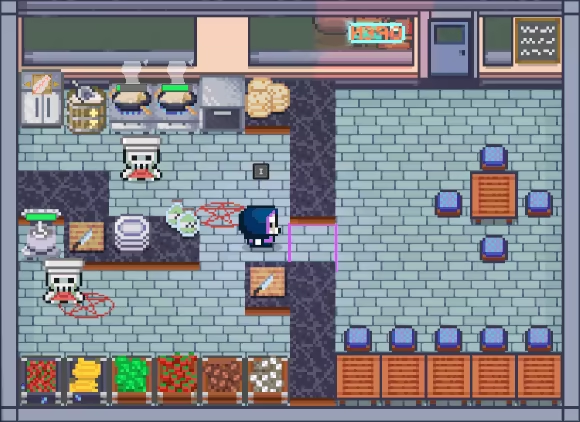
From the store page, unedited. May contain spoilers.
This release
Reviews and playtime
Very Positive
96% of 343
The game
Genres and features
How to install Bone's Cafe
Pre-installed, so there is no setup wizard. Follow these in order.
- 01
Create a games folder
Make a folder like C:\Games\ and keep every game in it. Avoid Program Files, Downloads and the Desktop.
- 02
Exclude it from Windows Defender
Defender often deletes cracked files by mistake while they extract. Add C:\Games\ as an excluded folder:
Windows Security -> Virus & threat protection -> Manage settings -> Exclusions -> Add an exclusion -> Folder
- 03
Download into C:\Games\
Save the archive straight into that folder. This release is one 286 MB file.
- 04
Extract it there
Use 7-Zip or WinRAR. Keep about 629.2 MB free while it unpacks.
- One file
- Right-click it -> Extract here.
- Several parts
- Extract only part1 (or .001). The other parts are read automatically.
- 05
Open README.html
It is inside the extracted folder and explains how to start the game.
Still stuck? Read the install help
Download
Set up your games folder and the Defender exclusion before you extract. The Install tab has the steps.
FileDitch
The whole game in one file
VikingFile
The whole game in one file
FileQ
The whole game in one file
Gofile (legacy)
The whole game in one file
We don't accept fix requests when only one host is down. Please use another mirror above. Links broken? Let us know.
We never password-protect files or hide installers. If a page asks for a password or payment, that is the host's ad, not us. See our safety guide.
System requirements
- Min
- Windows 7 / 8 / 10 / 11
- Rec
- -
- Min
- Potato
- Rec
- -
- Min
- 2 GB RAM
- Rec
- -
- Min
- Potato
- Rec
- -
- Min
- 500 MB available space
- Rec
- -
- Min
- Controller compatible
- Rec
- -
These are the developer's listed requirements and may not be 100% accurate. If your specs fall below the minimum, try the game anyway; many games run fine below the listed requirements. When in doubt, check YouTube for performance benchmarks.