Bookshop Simulator
Blep Games2025Simulation, Management
2.0 GBBuild 23158329Updated 200 days ago
About Bookshop Simulator
Open your own bookshop! Order books, stock your shelves, and earn revenue. Use your profits to decorate, expand, and hire staff. Collect rare books that give powerful abilities. Adopt a cat to keep you and your customers company along the way!

Fulfill your dream of owning and operating your own bookshop. Buy and sell inventory and use the profits to decorate and expand your shop. Build your business from a small boutique shop into a retail empire!
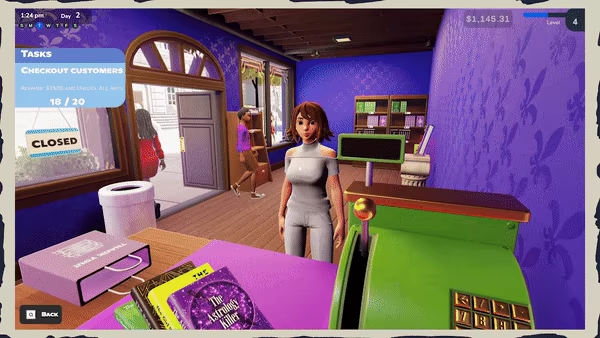

Buy and place bookshelves, then fill them with new books, comics, board games, and other items to sell. Run the cash register to earn revenue. As your business grows, hire employees to be cashiers and item stockers so you can focus on expansion.


Expand your reach to new locations around the world. Use your income from established shops to help set up new shops. Travel between shops to manage them and optimize your profits. Early access will launch with the France and Japan locations.


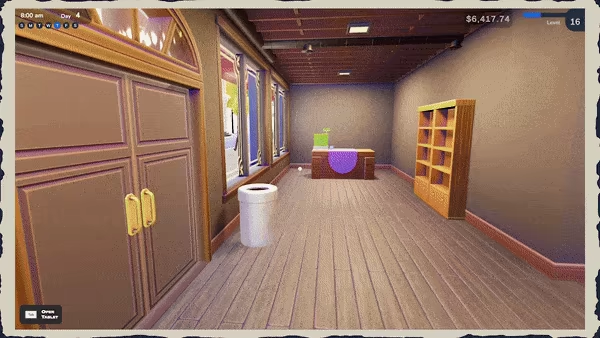
Use your profits to customize your store. Choose walls and floors. Decorate with rugs, plants, wall art, and more! Create specialized sections for your favorite genre, or build cozy book nooks.

Get boxes of used books that may contain rare mythical books. These books have powerful abilities to improve your profits and capabilities.


Adopt a cat to keep you and your customers company every day in the shop. Buy food, a bed, and other items to keep the cat active and happy in the store.

From the store page, unedited. May contain spoilers.
This release
Reviews and playtime
Very Positive
92% of 1,617
The game
Genres and features
How to install Bookshop Simulator
Pre-installed, so there is no setup wizard. Follow these in order.
- 01
Create a games folder
Make a folder like C:\Games\ and keep every game in it. Avoid Program Files, Downloads and the Desktop.
- 02
Exclude it from Windows Defender
Defender often deletes cracked files by mistake while they extract. Add C:\Games\ as an excluded folder:
Windows Security -> Virus & threat protection -> Manage settings -> Exclusions -> Add an exclusion -> Folder
- 03
Download into C:\Games\
Save the archive straight into that folder. This release is one 2.0 GB file.
- 04
Extract it there
Use 7-Zip or WinRAR. Keep about 4.4 GB free while it unpacks.
- One file
- Right-click it -> Extract here.
- Several parts
- Extract only part1 (or .001). The other parts are read automatically.
- 05
Open README.html
It is inside the extracted folder and explains how to start the game.
Still stuck? Read the install help
Download
Set up your games folder and the Defender exclusion before you extract. The Install tab has the steps.
VikingFile
The whole game in one file
FileQ
The whole game in one file
Pixeldrain
The whole game in one file
Pixeldrain slows free downloads to a few MB/s. The Copy fast link button gives you a bypass link with no speed limit. Paste it into your download manager, or into your browser's address bar.
Gofile (legacy)
The whole game in one file
We don't accept fix requests when only one host is down. Please use another mirror above. Links broken? Let us know.
We never password-protect files or hide installers. If a page asks for a password or payment, that is the host's ad, not us. See our safety guide.
System requirements
- Min
- Intel i5 3550 / AMD Ryzen 5 2600
- Rec
- Intel i7 9700 / AMD Ryzen 7 3700X
- Min
- GTX 1060 / RX 580
- Rec
- GTX 1070 / Vega 56
Windows 10 (64-bit)
8 GB RAM
Version 11
10 GB available space
These are the developer's listed requirements and may not be 100% accurate. If your specs fall below the minimum, try the game anyway; many games run fine below the listed requirements. When in doubt, check YouTube for performance benchmarks.