
cyubeVR
Stonebrick Studios2018Survival, Sandbox
7.3 GBBuild 13419457Updated 249 days ago
About cyubeVR
Immerse yourself in a voxel game exclusively designed for VR. A beautiful infinite procedural world. Explore, gather resources, craft with your hands in 3D, and build anything you can imagine. Featuring great VR controls, near-infinite view distance, Steam Workshop mod support, and much more!
Come join the Discord!
Come join our official cyubeVR Discord Server with over 4500 members: discord .gg/cyubeVR
You can chat directly with the developer and talk about ideas, new features or report bugs. Also, beta builds with new features are always first tested by beta testers in the Discord to ensure all features are completely stable, polished and bug free when they are released for everyone in the default (stable) build.
Watch streamers first reactions to cyubeVR!
It's always awesome when streamers on Twitch or YouTube check out cyubeVR for the first time - here is a video showing their natural reactions to the game:
Index Controller Finger Tracking Support
cyubeVR has full support for Valve Index Controllers, with fully tracked fingers! Well animated fingers are also supported on other controllers (e.g. Quest).
About the Game

cyubeVR (pronounced Cube VR) is a virtual reality voxel game fully designed for VR.

The world in cyubeVR is entirely procedurally generated. Enter a seed or let the game generate one for you, and explore a unique and detailed infinite world that no one ever saw before.
Find your way through complex cave networks going deep into the ground, climb up huge hills to get a great view over the world or try to build yourself a way up to massive floating islands.
All of that fully optimized for VR to get you the most immersive experience possible. There are no limits how far you can travel – your unique world is infinite in size.

Gather resources in the world and use those to build anything you have in mind. Allow your creativity and imagination to run free. Design a fortress on top of a mountain, construct a bridge to connect two floating islands or dig yourself deep into the ground and work on complex underground structures.
Experience a building system exclusively optimized for roomscale VR in a way that was never seen before. You can even move blocks after you have placed them!
Thanks to roomscale VR, even have a good conscience for the workout you did while you can marvel your new creations.
In VR there is no need for any UI, menus or buttons for crafting. Just use your hands and naturally craft tools and other items directly in the world.

A FEW SPECIAL FEATURES WORTH MENTIONING:
Gravity Gloves! You never have to bend down or move much to reach items or tools - you can easily grab anything using gravity gloves:

Dynamic Weather! The weather dynamically and smoothly changes between sunny, rain, and snow. And cyubeVR probably has the best-looking snow of all existing VR games!

Great building controls, designed from the ground up for VR! You can mine, collect and charge magic crystals to conveniently place up to 9 blocks at once.
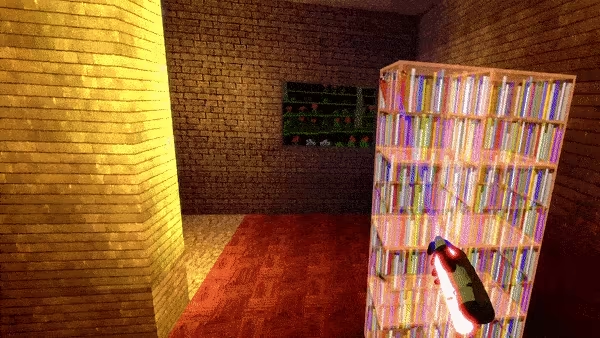
Full finger tracking on the controllers that support it (Valve Index Controllers), and the closest possible approximation on other controllers (Touch Controllers, Vive Controllers)

The game automatically detects which controller you are using and adjusts the controls to optimally work with your controller, and automatically shows you the tutorial fitting for your exact controller - currently, the game has 4 different control schemes, individually designed for:
HTC Vive Controllers
Valve Index Controllers
Oculus Touch Controllers (Rift, Rift S, Quest, Quest 2)
Windows Mixed Reality Controllers
Use either Smooth Locomotion or Teleport, depending on what you prefer. For the locomotion, you can choose between controller-oriented and head-oriented Smooth Locomotion. For turning, you can choose between snap turning and smooth turning. Snap turning offers options for either 22.5° steps or 45° steps, while smooth turning allows you to freely adjust the turn speed with a slider.
Dynamic Picture Frames that allow you to import any custom PNG/JPG files from your PC and display them in fully resizable and movable picture frames that you can decorate the wall of your virtual house with:

Dual Wielding with all tools! Twice as fast, and twice the fun.

There's an awesome furnace in the game, fully controlled with realistic VR mechanics! No UI interaction. Put combustible items into the lower chamber of the furnace, place items to melt in the upper chamber of the furnace, use flintstones to realistically generate sparks that light up the fire, and watch it operate!

You can easily collect items into your inventory using the awesome vacuum bucket that can be enhanced further with magic crystals for an even stronger effect! Blue crystal energy makes the bucket suck, red crystal energy makes the bucket blow. Use sunlight to charge a crystal blue, or use moonlight to charge a crystal red.

From the store page, unedited. May contain spoilers.
This release
Reviews and playtime
Very Positive
90% of 1,065
The game
Genres and features
How to install cyubeVR
Pre-installed, so there is no setup wizard. Follow these in order.
- 01
Create a games folder
Make a folder like C:\Games\ and keep every game in it. Avoid Program Files, Downloads and the Desktop.
- 02
Exclude it from Windows Defender
Defender often deletes cracked files by mistake while they extract. Add C:\Games\ as an excluded folder:
Windows Security -> Virus & threat protection -> Manage settings -> Exclusions -> Add an exclusion -> Folder
- 03
Download into C:\Games\
Save the archive straight into that folder. This release is one 7.3 GB file.
- 04
Extract it there
Use 7-Zip or WinRAR. Keep about 16.0 GB free while it unpacks.
- One file
- Right-click it -> Extract here.
- Several parts
- Extract only part1 (or .001). The other parts are read automatically.
- 05
Open README.html
It is inside the extracted folder and explains how to start the game.
Still stuck? Read the install help
Download
Set up your games folder and the Defender exclusion before you extract. The Install tab has the steps.
VikingFile
The whole game in one file
FileQ
The whole game in one file
Pixeldrain
The whole game in one file
Pixeldrain slows free downloads to a few MB/s. The Copy fast link button gives you a bypass link with no speed limit. Paste it into your download manager, or into your browser's address bar.
Gofile (legacy)
The whole game in one file
Datavaults.co
The whole game in one file
Bowfile
The whole game in one file
Ranoz.gg
The whole game in one file
We don't accept fix requests when only one host is down. Please use another mirror above. Links broken? Let us know.
We never password-protect files or hide installers. If a page asks for a password or payment, that is the host's ad, not us. See our safety guide.
System requirements
- Min
- Windows 7 or newer
- Rec
- Windows 10 or newer
- Min
- AMD Ryzen or Intel CPU, from 2014 or later with at least 6 threads
- Rec
- AMD Ryzen or Intel CPU, from 2016 or later with at least 8 threads
- Min
- 14 GB RAM
- Rec
- 16 GB RAM
- Min
- 6 GB VRAM | Nvidia GTX 1060 // AMD RX 580
- Rec
- 12 GB VRAM | Nvidia RTX 3060 // AMD RX 7600 XT
- Min
- 20 GB available space
- Rec
- 25 GB available space
These are the developer's listed requirements and may not be 100% accurate. If your specs fall below the minimum, try the game anyway; many games run fine below the listed requirements. When in doubt, check YouTube for performance benchmarks.