
Waseku2026Simulation, Puzzle
791.4MBBuild 25828717Updated 46 days ago
About Data Center
Build, cable, and automate. Assemble racks, servers, and switches, connect enough capacity for each app, earn money from processed data, and unlock gear and bigger customers with XP and reputation. Follow colored data packets as your center comes to life.

Build, cable, and grow a living data center from the ground up. Start with bare floors, buy racks, servers, and switches, then physically place and stack your hardware the way you want. Run Ethernet between ports to shape your network by hand and watch data spring to life: every customer’s traffic appears as colored packet-balls rolling along your cables, revealing bottlenecks, idle links, and beautifully tuned throughput at a glance.
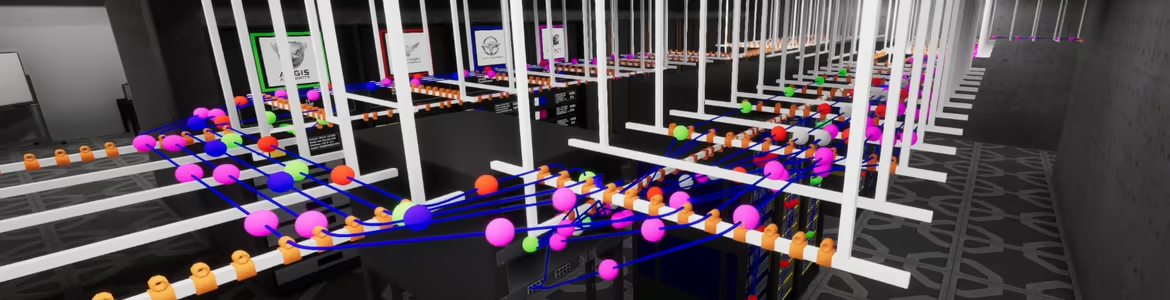
Customers arrive with app requirements and capacity targets. It’s your job to connect enough servers to each customer app, balance load across racks and switches, and keep the data flowing. As you successfully process customer data you earn money to expand, XP to unlock more capable devices, and reputation to attract bigger, more demanding clients. Hardware ages, too—servers and switches have end-of-life and can break—so design for uptime: keep services reachable even if devices on the path die, swap out failing gear, and build redundancy with servers that can use multiple network connections.
Tinker for perfect layouts or move fast to hit deadlines; either way, this is a tactile builder where every cable matters and every improvement is visible. No complex command lines—just the satisfying click of ports, the hum of stacked servers, and a vibrant river of packets proving your design works, even under failure.
Key features
Hands-on data center building: buy racks, servers, and switches; stack hardware and route Ethernet by hand.
Visual networking: see packets as colored balls per customer, making flow, congestion, and capacity instantly readable.
Customer-driven goals: connect enough servers to each app to meet requirements and keep contracts running.
Progression that rewards good design: process data to earn money, gain XP to unlock new devices, and build reputation to attract new customers.
Reliability and maintenance: devices have lifespans and can fail—plan replacements, manage downtime risk, and keep services online.
Redundancy that matters: give servers redundant connections and create alternate paths so traffic stays reachable when a switch or link dies.
Evolve your layout: upgrade hardware, recable to remove bottlenecks, and scale your floor from scrappy beginnings to a bustling operation.
Immediate feedback: every placement, failure, connection, and upgrade changes how packets move—optimize by watching the network breathe.
Build it your way, wire it your way, and grow from a single rack to a reputation that attracts the biggest clients—all powered by a network you can literally see working, surviving hiccups and hardware end-of-life along the way.
From the store page, unedited. May contain spoilers.
This release
Reviews and playtime
Mostly Positive
78% of 1,096
The game
Genres and features
How to install Data Center
Pre-installed, so there is no setup wizard. Follow these in order.
- 01
Create a games folder
Make a folder like C:\Games\ and keep every game in it. Avoid Program Files, Downloads and the Desktop.
- 02
Exclude it from Windows Defender
Defender often deletes cracked files by mistake while they extract. Add C:\Games\ as an excluded folder:
Windows Security -> Virus & threat protection -> Manage settings -> Exclusions -> Add an exclusion -> Folder
- 03
Download into C:\Games\
Save the archive straight into that folder. This release is one 791.4MB file.
- 04
Extract it there
Use 7-Zip or WinRAR. Keep about 1.7 GB free while it unpacks.
- One file
- Right-click it -> Extract here.
- Several parts
- Extract only part1 (or .001). The other parts are read automatically.
- 05
Open README.html
It is inside the extracted folder and explains how to start the game.
Still stuck? Read the install help
Download
Set up your games folder and the Defender exclusion before you extract. The Install tab has the steps.
FileDitch
The whole game in one file
VikingFile
The whole game in one file
Gofile (legacy)
The whole game in one file
We don't accept fix requests when only one host is down. Please use another mirror above. Links broken? Let us know.
We never password-protect files or hide installers. If a page asks for a password or payment, that is the host's ad, not us. See our safety guide.
System requirements
- Min
- Windows 10+
- Rec
- Windows 11 64 Bit
- Min
- Intel Core i5 - 4670 or AMD equivalent
- Rec
- Intel Core i5 - 6600k or AMD equivalent
- Min
- 8 GB RAM
- Rec
- 16 GB RAM
- Min
- NVIDIA GTX 960 or AMD equivalent
- Rec
- NVIDIA GTX 1070 or AMD equivalent
Version 11
4 GB available space
These are the developer's listed requirements and may not be 100% accurate. If your specs fall below the minimum, try the game anyway; many games run fine below the listed requirements. When in doubt, check YouTube for performance benchmarks.