
Desktop Raid
Lee_Studio2026Idle, RPG
370 MBBuild 22296792Updated 249 days ago
About Desktop Raid
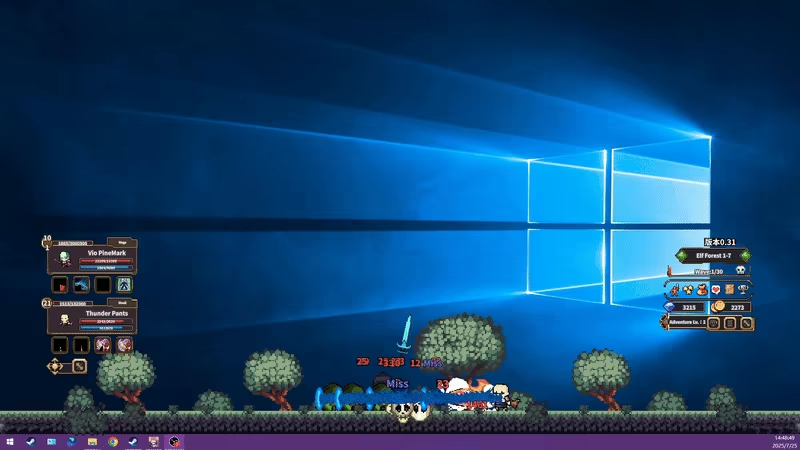
Assemble your adventure squad on the desktop! Classic RPG meets idle play—no grind, no stress, just nonstop progress. Your heroes fight, level up, and loot while you work or study. Explore rich classes, powerful skills, and thrilling gear drops. RPG excitement, anytime, anywhere!
【Bug Fix in Progress】

Set it in the corner of your desktop, and your heroes will continuously battle monsters and find treasure, whether you're working or slacking off! No manual control is needed and interruptions are no issue. The fully automated combat offers a completely relaxing leveling experience. Say goodbye to the fatigue of traditional RPGs with njihovim repetitive map runs, mob grinding, and skill clicking. Simply open the game anytime to harvest your loot, power up, and advance to new dungeons, effortlessly enjoying the thrill of soaring power levels!


This is an idle RPG you can really get hooked on—the monsters get stronger on their own, so the grinding never stops! Automated combat plows through everything from trash mobs to bosses, with gear dropping and stats rising constantly, perfectly recreating the satisfying loot loop of RPG dungeons. Slay, loot, and enhance, with the added thrill of random affixes and set effects. You can chase the ultimate god-tier gear, all while idling!


The game features over a dozen branching classes, from Warrior and Mage to Assassin, Summoner, Tomb Keeper, and Alchemist. Each hero possesses unique talents and growth paths! The number of skills is staggering, allowing for countless combat styles. You can build a screen-clearing AOE burst team, or a complex tactical squad combining summoning, control, and damage-over-time effects. Freely mix and match builds to create your ultimate dungeon-clearing party!


With its retro pixel art side-scrolling style, the game pays homage to the thrilling combat of classic RPGs! It sits neatly in a corner of your screen, taking up minimal space and not interfering with your work or studies. But a quick glance is all it takes to see your adventure squad in the heat of battle! Beneath its casual idle exterior lies a deep RPG progression system. Looting while idling and the satisfying pace of leveling up make for an exhilarating experience that’s sure to boost your mood, even if you’re just checking in during a break.


The combat unfolds in a side-scrolling auto-chess format. While the battles are fully automated, every lineup decision is packed with strategic depth! Frontline tanks, backline damage dealers, crowd control combos, main and sub-DPS synergy... with dozens of skills combining in random ways, you can unleash devastating damage combos or intricate control chains. Pulling off an upset with a weaker team or turning the tide with a single brilliant move all comes down to your understanding and strategic deployment of heroes!
From the store page, unedited. May contain spoilers.
This release
Reviews and playtime
Mostly Positive
76% of 730
The game
Genres and features

How to install Desktop Raid
Pre-installed, so there is no setup wizard. Follow these in order.
- 01
Create a games folder
Make a folder like C:\Games\ and keep every game in it. Avoid Program Files, Downloads and the Desktop.
- 02
Exclude it from Windows Defender
Defender often deletes cracked files by mistake while they extract. Add C:\Games\ as an excluded folder:
Windows Security -> Virus & threat protection -> Manage settings -> Exclusions -> Add an exclusion -> Folder
- 03
Download into C:\Games\
Save the archive straight into that folder. This release is one 370 MB file.
- 04
Extract it there
Use 7-Zip or WinRAR. Keep about 814.0 MB free while it unpacks.
- One file
- Right-click it -> Extract here.
- Several parts
- Extract only part1 (or .001). The other parts are read automatically.
- 05
Open README.html
It is inside the extracted folder and explains how to start the game.
Still stuck? Read the install help
Download
Set up your games folder and the Defender exclusion before you extract. The Install tab has the steps.
VikingFile
The whole game in one file
FileQ
The whole game in one file
Pixeldrain
The whole game in one file
Pixeldrain slows free downloads to a few MB/s. The Copy fast link button gives you a bypass link with no speed limit. Paste it into your download manager, or into your browser's address bar.
Gofile (legacy)
The whole game in one file
We don't accept fix requests when only one host is down. Please use another mirror above. Links broken? Let us know.
We never password-protect files or hide installers. If a page asks for a password or payment, that is the host's ad, not us. See our safety guide.
System requirements
- Min
- Intel Core i5
- Rec
- Intel Core i7
- Min
- 8 GB RAM
- Rec
- 16 GB RAM
- Min
- GTX1050ti
- Rec
- GTX1070
Windows
1 GB available space
These are the developer's listed requirements and may not be 100% accurate. If your specs fall below the minimum, try the game anyway; many games run fine below the listed requirements. When in doubt, check YouTube for performance benchmarks.