
DESOLUS
Mark J. Mayers2026Puzzle, Mystery
1.3GBBuild 26017503Updated 39 days ago
About DESOLUS
Explore a city of Gothic architecture torn between past and future in Desolus, a first person puzzle game. Solve Escher-like puzzles through the use of black holes. Travel through time to make structures whole and save the city from ruin.

Explore a city of Gothic architecture torn between past and future in Desolus, a first person puzzle game.
An enigmatic cataclysm has fractured reality, opening portals which lead to other times.
Explore the past and future versions of an expansive city.
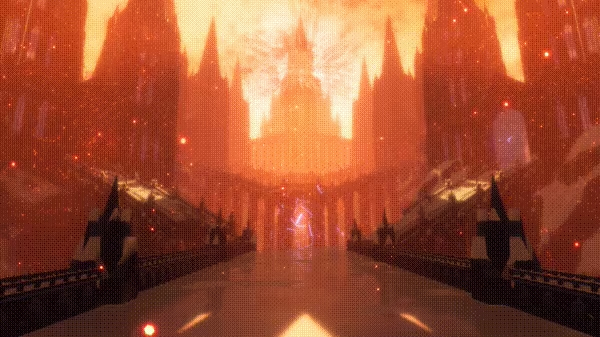
Manipulate Black Holes to Travel Through Time
Solve Escher-like puzzles through the use of black holes, traveling back and forth through time to make the city's architecture whole again. Challenge your spatial thinking skills while navigating distorted realities as time becomes increasingly more unstable.

Use Technology from a Lost Era
Activate holograms to move massive portals between floors of crumbled cathedrals,
allowing you to traverse structures which only partially exist at one time.

Save the City from Ruin
Partner with the city's mysterious guardian to prevent a cataclysm threatening to merge past and future.
Unravel a haunting narrative to save the City of Desolus from complete annihilation.

Desolus has been selected for several festivals, including
an exhibit at the Smithsonian American Art Museum.

From the store page, unedited. May contain spoilers.
This release
Reviews and playtime
Positive
83% of 40
The game
Genres and features
How to install DESOLUS
Pre-installed, so there is no setup wizard. Follow these in order.
- 01
Create a games folder
Make a folder like C:\Games\ and keep every game in it. Avoid Program Files, Downloads and the Desktop.
- 02
Exclude it from Windows Defender
Defender often deletes cracked files by mistake while they extract. Add C:\Games\ as an excluded folder:
Windows Security -> Virus & threat protection -> Manage settings -> Exclusions -> Add an exclusion -> Folder
- 03
Download into C:\Games\
Save the archive straight into that folder. This release is one 1.3GB file.
- 04
Extract it there
Use 7-Zip or WinRAR. Keep about 2.9 GB free while it unpacks.
- One file
- Right-click it -> Extract here.
- Several parts
- Extract only part1 (or .001). The other parts are read automatically.
- 05
Open README.html
It is inside the extracted folder and explains how to start the game.
Still stuck? Read the install help
Download
Set up your games folder and the Defender exclusion before you extract. The Install tab has the steps.
FilesYard
The whole game in one file
FileDitch
The whole game in one file
VikingFile
The whole game in one file
We don't accept fix requests when only one host is down. Please use another mirror above. Links broken? Let us know.
We never password-protect files or hide installers. If a page asks for a password or payment, that is the host's ad, not us. See our safety guide.
System requirements
- Min
- AMD Ryzen 5 2600X / Intel® Core™ i7-6800K
- Rec
- AMD Ryzen 5 3600X / Intel® Core™ i5-10600K
- Min
- 12 GB RAM
- Rec
- 16 GB RAM
- Min
- AMD Radeon RX 5700 / NVIDIA GeForce 1070
- Rec
- AMD Radeon RX 6600XT / NVIDIA RTX 2070
Windows 10 / 11
Version 11
4 GB available space
These are the developer's listed requirements and may not be 100% accurate. If your specs fall below the minimum, try the game anyway; many games run fine below the listed requirements. When in doubt, check YouTube for performance benchmarks.