
Weird Beluga2026Action, Adventure
13.4GBBuild 24903979Updated 47 days ago
About Duskfade
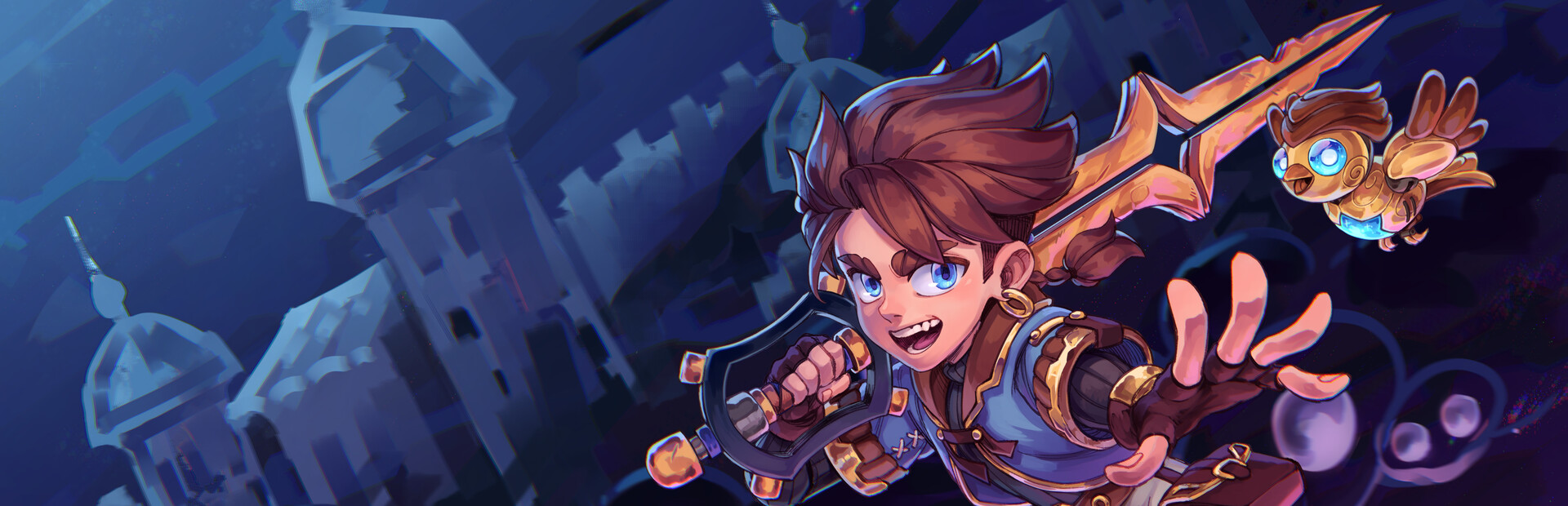
Shatter the shackles of time as you jump, swing, and slash through a fantastic world in this love letter to classic 3D action platformers. Zirian, accompanied by his mechanical Cuckoo, must save his sister from a mysterious Clock Tower that has plunged the land into eternal night.
Steam Deck Compatibility

About the Game
Help Zirian save his sister from the claws of Despair by restoring the fabric of time and uncovering the secrets of the Master Clockmakers.

Master a seamless blend of dynamic platforming and fast-paced combat. Jump, dash, grapple, and glide your way through thrilling challenges that rekindle the magic of classic action platformer favourites.

Explore stunning realms shaped by the Master Clockmakers, each filled with mystery, magic, breathtaking vistas, and endearing characters. Navigate ethereal forests, underwater realms, sunlit dunes and cloudy heights - the world of Duskfade is alive and teems with secrets for you to uncover.
Experience a powerful coming-of-age journey filled with heart, loss, and the courage to face the unknown. Join a cast of charming characters to face down long forgotten foes, each embodying an emotional hurdle.
From the store page, unedited. May contain spoilers.
This release
Reviews and playtime
Very Positive
90% of 943
The game
Genres and features


How to install Duskfade
Pre-installed, so there is no setup wizard. Follow these in order.
- 01
Create a games folder
Make a folder like C:\Games\ and keep every game in it. Avoid Program Files, Downloads and the Desktop.
- 02
Exclude it from Windows Defender
Defender often deletes cracked files by mistake while they extract. Add C:\Games\ as an excluded folder:
Windows Security -> Virus & threat protection -> Manage settings -> Exclusions -> Add an exclusion -> Folder
- 03
Download into C:\Games\
Save the archive straight into that folder. This release is one 13.4GB file.
- 04
Extract it there
Use 7-Zip or WinRAR. Keep about 29.5 GB free while it unpacks.
- One file
- Right-click it -> Extract here.
- Several parts
- Extract only part1 (or .001). The other parts are read automatically.
- 05
Open README.html
It is inside the extracted folder and explains how to start the game.
Still stuck? Read the install help
Download
Set up your games folder and the Defender exclusion before you extract. The Install tab has the steps.
FileDitch
The whole game in one file
VikingFile
The whole game in one file
Gofile (legacy)
The whole game in one file
We don't accept fix requests when only one host is down. Please use another mirror above. Links broken? Let us know.
We never password-protect files or hide installers. If a page asks for a password or payment, that is the host's ad, not us. See our safety guide.
System requirements
- Min
- Win10 64-bits
- Rec
- 64 bit Windows 10/11
- Min
- Intel i5-8400 or AMD Ryzen5 1500X or faster processor
- Rec
- Intel i7-9700 or AMD Ryzen5 2600X or faster processor
- Min
- 8 GB RAM
- Rec
- 16 GB RAM
- Min
- Nvidia GTX1050Ti 4GB or AMD RX580 4GB or Higher
- Rec
- Nvidia RTX2060 8GB or AMD 5700 8GB or Higher
Version 12
20 GB available space
These are the developer's listed requirements and may not be 100% accurate. If your specs fall below the minimum, try the game anyway; many games run fine below the listed requirements. When in doubt, check YouTube for performance benchmarks.