
Farlands
Eric Rodríguez2026Life Sim, Indie
395.6 MBBuild 24257919Updated 130 days ago
About Farlands
Congratulations, you’ve bought your own planet! An agrarian rock at the edge of the galaxy that, for some reason, was practically being given away for free. So the time has come to leave your hectic, stressful life in an overcrowded metropolis for a more rural and rewarding life.
Roadmap

After two years in Early Access and 10 major updates, Farlands’ roadmap has been completed as planned.
Thank you so much!

About the Game

Seeking a lifestyle change, you saw an offer you couldn’t refuse: an entire planet going for a bargain price! An old agrarian rock in an outlying solar system that’s been lying abandoned for years. So, with little more than your worn-out ship and your personal assistance droid, you decide to embark on a new phase of your life in a lost corner of the galaxy.


Restore your planet!
Cut weeds, clear paths, reclaim fields, and fix what the passage of time has destroyed. Turn an old agrarian rock into a thriving homestead.


Explore the solar system!
Although your ship has seen better days, it can still help you move between the different planets in the solar system, explore them, and collect resources to improve your farm, your tools, and your ship.
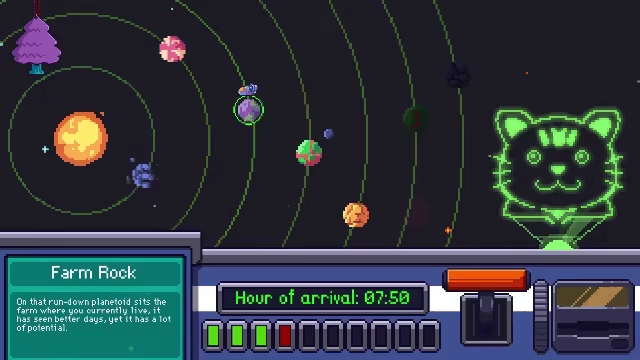

Be part of the community!
Make contact with the handful of people who still live on the solar system’s planets. Learn their stories and the reasons why they decided to stay in such a remote part of the galaxy.


Save the solar system and restore it to its former glory!
A whole planet at a bargain price? Perhaps there’s a reason for that... Maybe things won’t be as simple as they first seemed!
From the store page, unedited. May contain spoilers.
This release
Reviews and playtime
Very Positive
89% of 1,674
The game
Genres and features

How to install Farlands
Pre-installed, so there is no setup wizard. Follow these in order.
- 01
Create a games folder
Make a folder like C:\Games\ and keep every game in it. Avoid Program Files, Downloads and the Desktop.
- 02
Exclude it from Windows Defender
Defender often deletes cracked files by mistake while they extract. Add C:\Games\ as an excluded folder:
Windows Security -> Virus & threat protection -> Manage settings -> Exclusions -> Add an exclusion -> Folder
- 03
Download into C:\Games\
Save the archive straight into that folder. This release is one 395.6 MB file.
- 04
Extract it there
Use 7-Zip or WinRAR. Keep about 870.3 MB free while it unpacks.
- One file
- Right-click it -> Extract here.
- Several parts
- Extract only part1 (or .001). The other parts are read automatically.
- 05
Open README.html
It is inside the extracted folder and explains how to start the game.
Still stuck? Read the install help
Download
Set up your games folder and the Defender exclusion before you extract. The Install tab has the steps.
FileDitch
The whole game in one file
FileQ
The whole game in one file
Pixeldrain
The whole game in one file
Pixeldrain slows free downloads to a few MB/s. The Copy fast link button gives you a bypass link with no speed limit. Paste it into your download manager, or into your browser's address bar.
We don't accept fix requests when only one host is down. Please use another mirror above. Links broken? Let us know.
We never password-protect files or hide installers. If a page asks for a password or payment, that is the host's ad, not us. See our safety guide.
System requirements
Windows 10
2 Ghz
2 GB RAM
256 mb video memory, shader model 3.0+
500 MB available space
These are the developer's listed requirements and may not be 100% accurate. If your specs fall below the minimum, try the game anyway; many games run fine below the listed requirements. When in doubt, check YouTube for performance benchmarks.