
Felvidek
Vlado Ganaj2024RPG, JRPG
724.4 MBBuild 18709219Updated 139 days ago
About Felvidek
In Felvidek, a JRPG set in 15th century Slovakia, you embrace the role of an alcoholic knight Pavol. Meet diverse and interesting characters to help you drive out the Hussites and Ottomans who blight this land.

Find out what unlikely events take place in this alternate history region of Slovak Highlands. This land is ravaged by Hussite pillagers and Ottoman spies while surreal horrors dwell in the dark. It's now up to Pavol, a fair knight with alcohol problems, to gather a party and stop those who oppose our kingdom.
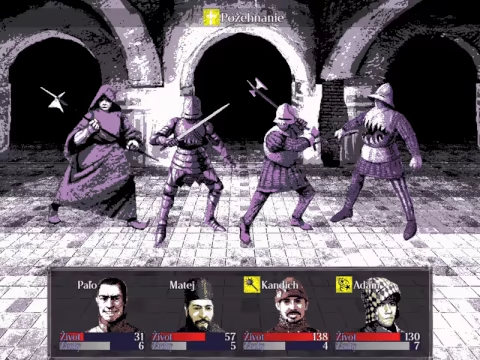
GAMEPLAY
- Traverse the hand-painted world to explore castles, settlements, dungeons. Unveil secret doors and hidden passageways.
- Progress the story by meeting interesting characters, whether it be Catholics, Hussites or even more sinister folk.
- Fight your way through different enemies in turn-based RPG combat. Gather gear and supplies for your character.
- Completed in 3-4 hours.

From the store page, unedited. May contain spoilers.
This release
Reviews and playtime
Overwhelmingly Positive
98% of 5,747
The game
Genres and features
How to install Felvidek
Pre-installed, so there is no setup wizard. Follow these in order.
- 01
Create a games folder
Make a folder like C:\Games\ and keep every game in it. Avoid Program Files, Downloads and the Desktop.
- 02
Exclude it from Windows Defender
Defender often deletes cracked files by mistake while they extract. Add C:\Games\ as an excluded folder:
Windows Security -> Virus & threat protection -> Manage settings -> Exclusions -> Add an exclusion -> Folder
- 03
Download into C:\Games\
Save the archive straight into that folder. This release is one 724.4 MB file.
- 04
Extract it there
Use 7-Zip or WinRAR. Keep about 1.6 GB free while it unpacks.
- One file
- Right-click it -> Extract here.
- Several parts
- Extract only part1 (or .001). The other parts are read automatically.
- 05
Open README.html
It is inside the extracted folder and explains how to start the game.
Still stuck? Read the install help
Download
Set up your games folder and the Defender exclusion before you extract. The Install tab has the steps.
FileDitch
The whole game in one file
FileQ
The whole game in one file
Pixeldrain
The whole game in one file
Pixeldrain slows free downloads to a few MB/s. The Copy fast link button gives you a bypass link with no speed limit. Paste it into your download manager, or into your browser's address bar.
We don't accept fix requests when only one host is down. Please use another mirror above. Links broken? Let us know.
We never password-protect files or hide installers. If a page asks for a password or payment, that is the host's ad, not us. See our safety guide.
System requirements
- Min
- Windows XP, Vista, 7, 8, 10
- Min
- 2.0 GHz or faster
- Min
- 512 MB RAM
- Min
- 1024 x 768 or higher resolution
- Min
- 700 MB available space
These are the developer's listed requirements and may not be 100% accurate. If your specs fall below the minimum, try the game anyway; many games run fine below the listed requirements. When in doubt, check YouTube for performance benchmarks.