Crisalu Games2025Simulation, Casual
5.0GBBuild 26473850Updated 11 days ago
About Goblin Cleanup
A co-op cleaning game where you have to clean and rearrange a dungeon before the next adventurers come to complete it again.
Early Access Roadmap

About the Game


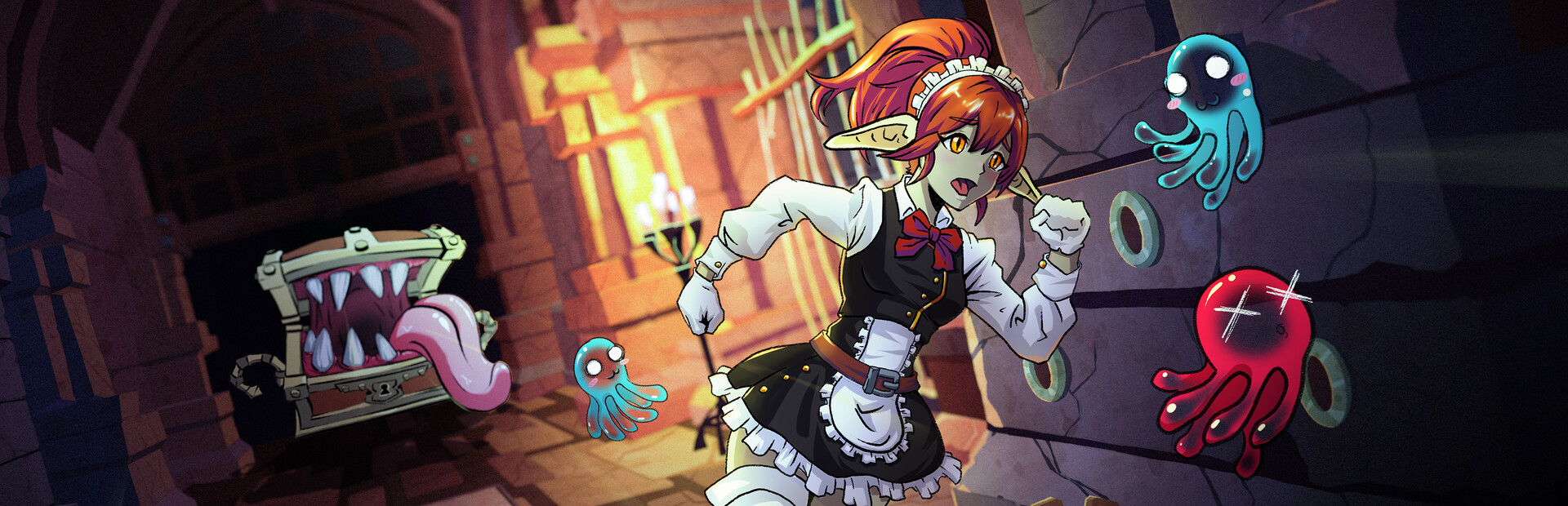
Have you ever wondered what happens after completing a dungeon, how it is restarted or, better yet, who is in charge of doing it? In Goblin Cleanup, you assume the role of a professional cleaner hired by the dungeon manager to clean and prepare the dungeon for the next adventure. You can perform this task alone or with up to three companions, cooperatively or maybe not so cooperatively!


Be careful because the dungeons are dark and full of terrors, although as a professional cleaner this is not a problem, just don't step on a trap, and keep the monsters fed, you don't want them to eat you, or any of your friends.

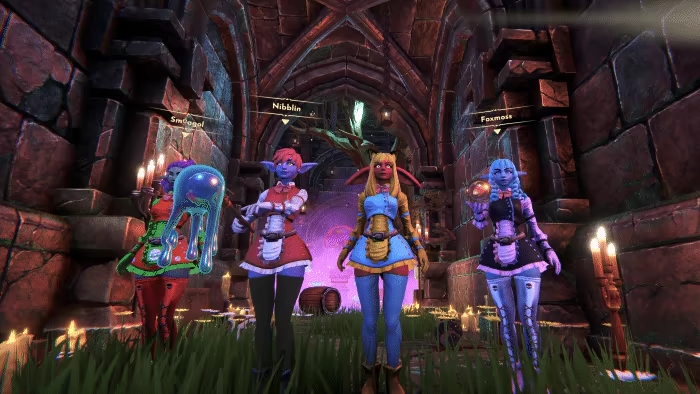
You can clean the dungeons with three more employees, just watch what they do, because if they die you will have to clean their pieces and blood, the heroes already leave everything very dirty to make things worse.
Clean the dungeons in cooperative games for 4 players online.

Key Features
Goblin Maid: What better way to clean up than doing it like a pro? Play as a goblin alongside other goblins.
Clean: It's your job to clean up the mess, so clean it up you shall! Use your Slimop, mimic, and slime dispenser tool to help you remove all that blood from the floor and ceiling!
Restore Objects: To ensure the dungeon returns to its original state, you must restore objects and place them back in their original positions.
Restore Traps: What kind of dungeon would it be without traps? You'll need to restore and reactivate them. Be cautious; there might be traps that weren't triggered by adventurers and are still active.
Creatures: You'll also need to respawn creatures and dispose of their remains. Additionally, some creatures might not have perished.
Loot: You'll also need to refill chests with items.
Dynamic Dungeons: Each dungeon is filled with unique challenges...and hazards!
From the store page, unedited. May contain spoilers.
This release
Reviews and playtime
Very Positive
87% of 1,672
The game
Genres and features


How to install Goblin Cleanup
Pre-installed, so there is no setup wizard. Follow these in order.
- 01
Create a games folder
Make a folder like C:\Games\ and keep every game in it. Avoid Program Files, Downloads and the Desktop.
- 02
Exclude it from Windows Defender
Defender often deletes cracked files by mistake while they extract. Add C:\Games\ as an excluded folder:
Windows Security -> Virus & threat protection -> Manage settings -> Exclusions -> Add an exclusion -> Folder
- 03
Download into C:\Games\
Save the archive straight into that folder. This release is one 5.0GB file.
- 04
Extract it there
Use 7-Zip or WinRAR. Keep about 11.0 GB free while it unpacks.
- One file
- Right-click it -> Extract here.
- Several parts
- Extract only part1 (or .001). The other parts are read automatically.
- 05
Open README.html
It is inside the extracted folder and explains how to start the game.
Still stuck? Read the install help
Download
Set up your games folder and the Defender exclusion before you extract. The Install tab has the steps.
FilesYard
The whole game in one file
FileDitch
The whole game in one file
VikingFile
The whole game in one file
We don't accept fix requests when only one host is down. Please use another mirror above. Links broken? Let us know.
We never password-protect files or hide installers. If a page asks for a password or payment, that is the host's ad, not us. See our safety guide.