Line War
Studio Centurion2022Strategy, Tactics
1.3GBBuild 23899409Updated 76 days ago
About Line War
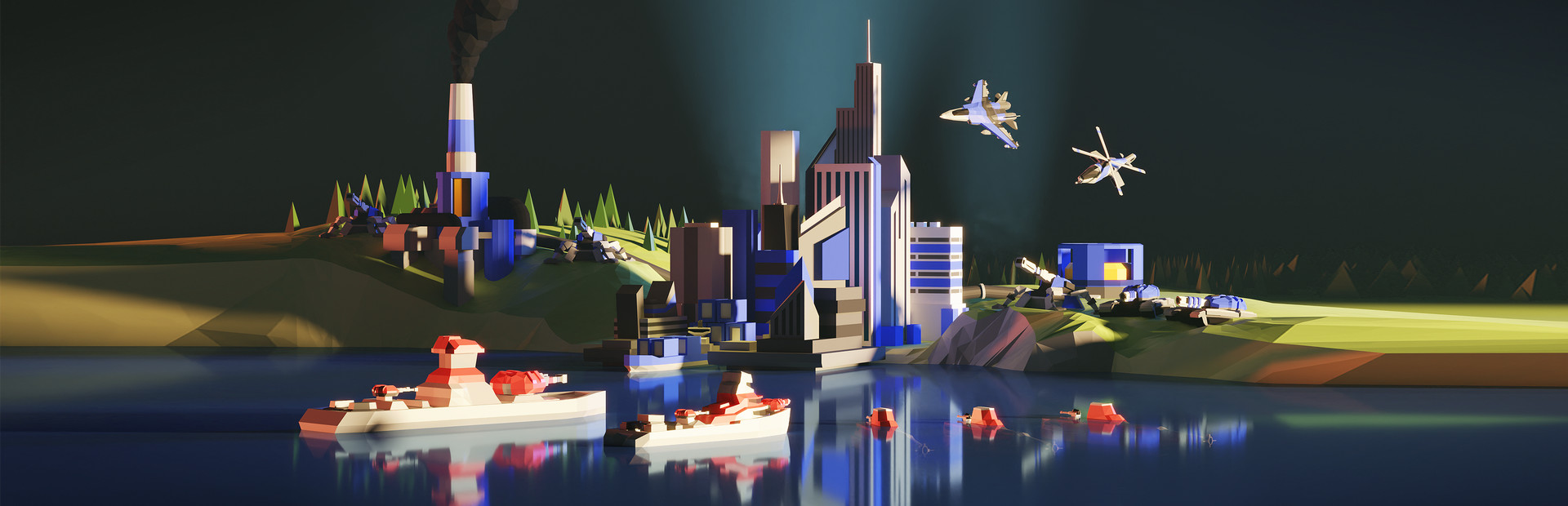
A new type of RTS with elements from 4X, Wargame, and Real-Time Tactics. Draw commands and execute a superior strategy to defeat your opponent, focusing on high-level decisions rather than constant micromanagement.
Inspired by classic RTS titles like Command & Conquer with a nod to famed board game Axis & Allies, Line War combines elements of 4X, wargame, and real-time tactics genres into a unique strategic experience for veterans and newcomers.
Line War’s versatile control system allows players to quickly and intuitively issue commands by drawing lines across the battlefield to move units, form defensive lines, engage enemies and conquer territories. Configure your command lines to filter out certain units to flank your enemies, dig-in or feed distant frontlines.


This game has a never-before-seen approach that lets you focus on drawing commands and executing a strategy rather than managing individual units. Chain commands and execute orchestrated operations for coordinated attacks against your opponent. This command system sets Line War apart from other strategy games.


Line War features a single traditional, recognizable army to ensure the game’s focus is on balance and strategy. Each unit plays a distinct and carefully balanced role.


Line War focuses on strategy. We've designed the game around the typical RTS problems to remove the steep learning curve and need for ultra-fast micro-management so you can focus on planning and executing a strategy.


Multiplayer. Play up to 8 players online in duel, team, ffa, and co-op modes. All multiplayer game modes and constellations support between 0 and 3 AI players.
Single-player. Play together with up to 3 AI opponents in duel, team or ffa modes.
Co-op. Team up and take on the AIs together.
Draw Commands. Create movement and attack commands by drawing directly onto the map, giving players flexible control over unit actions.
Replay Again & Again. Randomly generate asymmetrical worlds to ensure no match or strategy is ever the same.
Select Your Starting Location. Choose where to begin in each world in an innovative and fair "picking phase" to gain your initial territory.
Focus on Strategy. Plan and strategize to achieve success on the battlefield. Actions Per Minute (APM) aren't crucial for success in Line War - strategy and planning are.
Conquer Territory. Expand your influence and acquire resources through territory control. The more land you have, the more you’ll be able to build.
Manage Resources. Produce energy with refineries and power plants for sustained mobility of tanks, air force, and naval vessels.
Control One Army. Line War features a single traditional, recognizable army to ensure the game’s focus is on balance and strategy.
Build. Build. Build. From barracks to refineries, ports to power plants, choose from dozens of unique structures. Build towns, cities, industries, and trade routes to earn resources and expand your forces.
Handicap system. People with different skills can play against each other and asymmetric matches, like 2v1, are supported.

From the store page, unedited. May contain spoilers.
This release
Reviews and playtime
Very Positive
80% of 1,078
The game
Genres and features
How to install Line War
Pre-installed, so there is no setup wizard. Follow these in order.
- 01
Create a games folder
Make a folder like C:\Games\ and keep every game in it. Avoid Program Files, Downloads and the Desktop.
- 02
Exclude it from Windows Defender
Defender often deletes cracked files by mistake while they extract. Add C:\Games\ as an excluded folder:
Windows Security -> Virus & threat protection -> Manage settings -> Exclusions -> Add an exclusion -> Folder
- 03
Download into C:\Games\
Save the archive straight into that folder. This release is one 1.3GB file.
- 04
Extract it there
Use 7-Zip or WinRAR. Keep about 2.9 GB free while it unpacks.
- One file
- Right-click it -> Extract here.
- Several parts
- Extract only part1 (or .001). The other parts are read automatically.
- 05
Open README.html
It is inside the extracted folder and explains how to start the game.
Still stuck? Read the install help
Download
Set up your games folder and the Defender exclusion before you extract. The Install tab has the steps.
FileDitch
The whole game in one file
FileQ
The whole game in one file
Pixeldrain
The whole game in one file
Pixeldrain slows free downloads to a few MB/s. The Copy fast link button gives you a bypass link with no speed limit. Paste it into your download manager, or into your browser's address bar.
Gofile (legacy)
The whole game in one file
We don't accept fix requests when only one host is down. Please use another mirror above. Links broken? Let us know.
We never password-protect files or hide installers. If a page asks for a password or payment, that is the host's ad, not us. See our safety guide.
System requirements
- Min
- Windows 7 / Windows 10 / Windows 11
- Rec
- Windows 11
- Min
- 2048 MB RAM
- Rec
- 4096 MB RAM
- Min
- Version 10
- Rec
- Version 11
- Min
- 1000 MB available space
- Rec
- 1500 MB available space
X64 architecture
DX10, DX11, and DX12-capable GPUs
Any
These are the developer's listed requirements and may not be 100% accurate. If your specs fall below the minimum, try the game anyway; many games run fine below the listed requirements. When in doubt, check YouTube for performance benchmarks.