
LumbearJack
FinalBoss Games2022Casual, Adventure
152.4MBBuild 8718053Updated 42 days ago
About LumbearJack
Grab your axe and save the environment by chopping and recycling every man-made thing in your path and solving puzzles with your charming animal friends!

About This Game
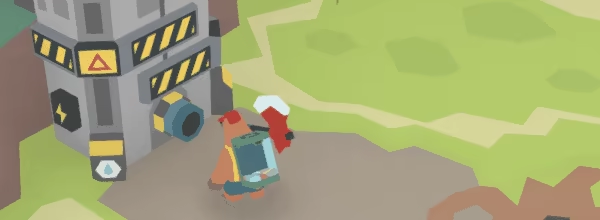
Jack is a humble bear with a simple dream: to return nature to its former glory with the help of his trusty axe and his animal friends. Slice and dice through machinery, slap some sense into wasteful humans, and work with wacky woodland critters to thwart the sinister plans of up-and-coming industrial giant Evil Works.Jack and his friends have partnered with Ecologi to make the world a greener place! For every copy of LumbearJack purchased, a portion of every sale goes to planting trees. Check out our impact at:
Features
- Play as a bear with an axe!
- Chop your way through forests, construction sites, and more exciting locations in a variety of puzzles which utilize elements in the world around you.
- Solve puzzles by tinkering with the environment around you.
- Reduce, reuse, and recycle waste to upgrade your chopping capabilities.
- Save a quirky cast of animal friends and team up with them to save the day.
- Take down an evil corporation dead set on destroying nature as we know it.
Meet the Team!
FinalBoss Games is a team of experienced game developers from across the globe making seriously professional games that are seriously fun to play. Their previous games include the robot arcade puzzle game Vesta and musical sports game Dodgeball Beats.From the store page, unedited. May contain spoilers.
This release
Reviews and playtime
Very Positive
95% of 276
The game
Genres and features
How to install LumbearJack
Pre-installed, so there is no setup wizard. Follow these in order.
- 01
Create a games folder
Make a folder like C:\Games\ and keep every game in it. Avoid Program Files, Downloads and the Desktop.
- 02
Exclude it from Windows Defender
Defender often deletes cracked files by mistake while they extract. Add C:\Games\ as an excluded folder:
Windows Security -> Virus & threat protection -> Manage settings -> Exclusions -> Add an exclusion -> Folder
- 03
Download into C:\Games\
Save the archive straight into that folder. This release is one 152.4MB file.
- 04
Extract it there
Use 7-Zip or WinRAR. Keep about 335.3 MB free while it unpacks.
- One file
- Right-click it -> Extract here.
- Several parts
- Extract only part1 (or .001). The other parts are read automatically.
- 05
Open README.html
It is inside the extracted folder and explains how to start the game.
Still stuck? Read the install help
Download
Set up your games folder and the Defender exclusion before you extract. The Install tab has the steps.
FileDitch
The whole game in one file
VikingFile
The whole game in one file
0807
The whole game in one file
We don't accept fix requests when only one host is down. Please use another mirror above. Links broken? Let us know.
We never password-protect files or hide installers. If a page asks for a password or payment, that is the host's ad, not us. See our safety guide.
System requirements
- Min
- Windows 7
- Rec
- Windows 10
- Min
- Intel Core i3-3240 (2 * 3400), or AMD A8-3850 (4 * 2900), or equivalent
- Rec
- Intel Core i7-950 (4 * 3000), or AMD FX-4300 (4 * 3800), or equivalent
- Min
- 4 GB RAM
- Rec
- 8 GB RAM
- Min
- GeForce GT 640 (2048 VRAM) or Radeon R7 250 (2048 VRAM)
- Rec
- GeForce GTX 745 (4096 VRAM) or Radeon HD 7770 (1024 VRAM)
1 GB available space
These are the developer's listed requirements and may not be 100% accurate. If your specs fall below the minimum, try the game anyway; many games run fine below the listed requirements. When in doubt, check YouTube for performance benchmarks.