
Permadyn Interactive2026Simulation, City Builder
108.4GBBuild 25400535Updated 71 days ago
About MapCity
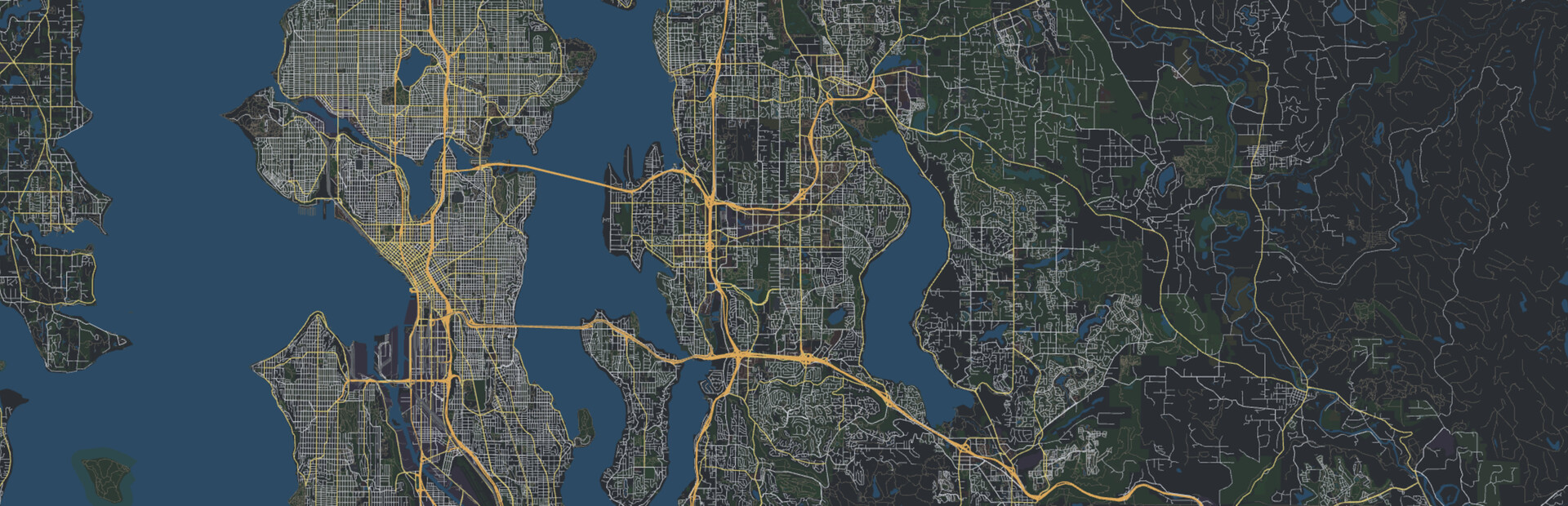
MapCity is an Early Access sandbox for drawing and editing cities, not a traditional city management game. You create roads, buildings, and landscapes on a blank map or optional real map data. Expect a different workflow, a learning curve, and rough edges.
EARLY ACCESS: PLEASE READ BEFORE BUYING
MapCity is a creative map sandbox, not a traditional city management game. You draw and edit the city yourself. The current game does not simulate a city economy or population, and deep city management simulation is not part of the current development plan.
MapCity is still early in development. Expect rough edges and tools that take time to learn. Even if you play other city builders, the workflow may feel unfamiliar. If you enjoy designing places, experimenting with tools, and setting your own goals, it may be a good fit. Please choose it for the experience available today.

A toolbox for people who enjoy making maps
If you are looking for a comprehensive toolbox for creating and editing city maps, MapCity may be what you are after. It brings road drawing, building placement, neighborhood development, and map styling into one creative sandbox. You can design an invented town or reshape an existing place, with the freedom to keep changing your layout.

Start with a blank map
The base game installs in less than 100 MB. No map DLCs are needed to create, edit, and save your own maps.
For your first session, start with a blank map and a small neighborhood. You can draw a road, place buildings beside it, add a park, and save your design. Once you are comfortable with those tools, you can try generating a block with the development tools or expand into another neighborhood. Starting small is the less demanding way to learn, especially on a lower end PC.

Draw, place, and change things
MapCity allows you to draw roads with curves, snapping, angle controls, and grids. You can place buildings, land, water, and boundaries, then move or reshape them. Layers, themes, and draw order let you adjust how the map looks. Your work stays editable, so you can revise a street or rebuild a whole area as your design develops.

Build a neighborhood with development tools
You can place buildings individually or use development tools to generate roads, parcels, and buildings across a selected area or alongside existing streets. You preview the layout, adjust the options, and add it to the map. The generated streets and buildings remain editable afterward.

Or work with an existing place
Optional free map DLCs provide existing places to explore and edit. You can change their roads and buildings or reshape an area with the same tools you use on a blank map. These are large, optional downloads, not required game files. North America currently needs approximately 114 GB to download and 186 GB when installed, with additional free space needed for installation and updates. Check Steam’s current size estimate and each DLC’s requirements before downloading.
3D views are experimental
MapCity includes 3D views for exploring your creations from another perspective. They are still in development and can be enabled as an experimental feature in Settings.
A note on performance and storage
Starting with a blank map is the less demanding way to play, especially on a lower end PC. Performance will depend on how large and detailed your creation becomes.
The optional free map DLCs are much more demanding. MapCity processes and renders their extensive map data locally on your PC, so these maps require large downloads, substantial storage, and more capable hardware. Loading and navigation may be slow, or performance may be too limited for comfortable play on a lower end PC. Check each DLC’s storage requirements before downloading.

From the store page, unedited. May contain spoilers.
This release
Includes1 DLC
- MapCity North America
Reviews and playtime
Mostly Positive
73% of 48
The game
Genres and features
How to install MapCity
Pre-installed, so there is no setup wizard. Follow these in order.
- 01
Create a games folder
Make a folder like C:\Games\ and keep every game in it. Avoid Program Files, Downloads and the Desktop.
- 02
Exclude it from Windows Defender
Defender often deletes cracked files by mistake while they extract. Add C:\Games\ as an excluded folder:
Windows Security -> Virus & threat protection -> Manage settings -> Exclusions -> Add an exclusion -> Folder
- 03
Download into C:\Games\
This release comes in 4 parts. Save every part into that folder, all from the same mirror.
- 04
Extract it there
Use 7-Zip or WinRAR. Keep about 238.5 GB free while it unpacks.
- One file
- Right-click it -> Extract here.
- Several parts
- Extract only part1 (or .001). The other parts are read automatically.
- 05
Open README.html
It is inside the extracted folder and explains how to start the game.
Still stuck? Read the install help
Download
Set up your games folder and the Defender exclusion before you extract. The Install tab has the steps.
Download every part. You need all of them.
We uploaded one or more servers incorrectly, so we've hidden them. The servers above have every part.
We don't accept fix requests when only one host is down. Please use another mirror above. Links broken? Let us know.
We never password-protect files or hide installers. If a page asks for a password or payment, that is the host's ad, not us. See our safety guide.
System requirements
- Min
- Windows 10
- Rec
- Windows 11
- Min
- Ryzen 3/Intel i3
- Rec
- Ryzen 5/Intel i5
- Min
- 8 GB RAM
- Rec
- 16 GB RAM
- Min
- Integrated
- Rec
- RTX 3050
1 GB available space
These are the developer's listed requirements and may not be 100% accurate. If your specs fall below the minimum, try the game anyway; many games run fine below the listed requirements. When in doubt, check YouTube for performance benchmarks.


