rat cream games2026Shooter, Horror
5.2GBBuild 26986806Updated 1 minute ago
About Milo
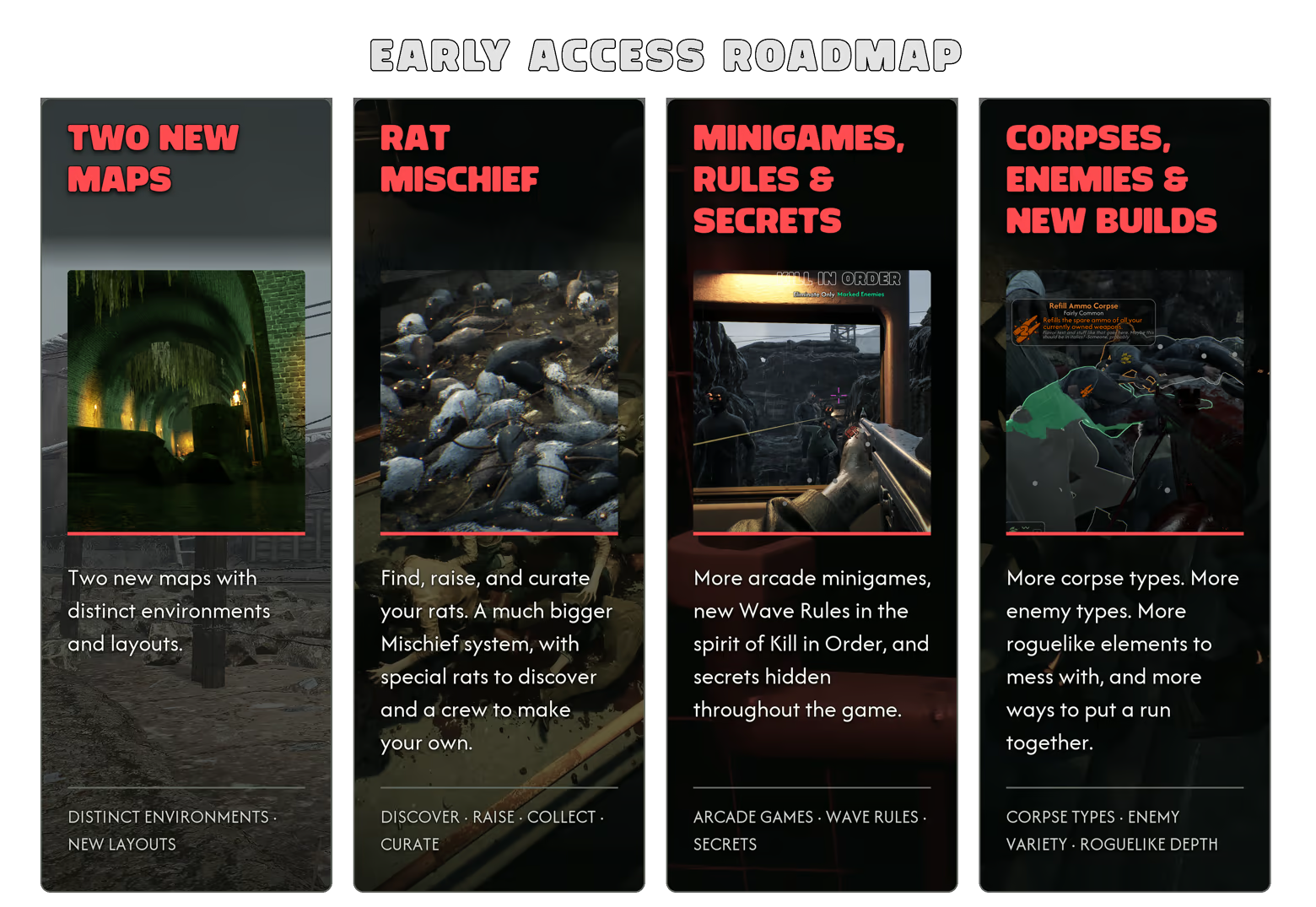
Fight alone or beside others trapped in the same nightmare. Survive waves of deranged cultists and grow your mischief of rats. The longer you stay, the more you can save, and the more you risk losing before reaching Traang, Milo’s Arcade.
Roadmap
About the Game
🩸🩸🩸
You awaken in a body you don't recognize. Disoriented, tattooed and abandoned in a hellish war zone, the distant gunfire is the least of your worries as deranged cultists hunt you down.
🩸Play alone or with a group. Cooperate or don't. 🩸You awaken and are forced to endure Milo's cruel game. You didn’t choose this.
 🩸Survive endless waves of cultists who are themselves victims of Milo
 🩸The dead feed your growing mischief of rats and charge your mysterious ability to pop corpses.
 🩸Extract with your rats to play games at the arcade to earn more tickets and upgrades.
 🩸Earn Traang Bucks by mustering rats and spend them on cosmetics and skins to show your friends how much better you are than them
Features:
One hand-crafted map Weltschmerz (more in development)
1-4 player Online Co-op Horde Survival
Account and Weapon Progression system
Grindable Weapon Skins
World War-era arsenal of 12+ Weapons Including: Kar98, M1 Garand, PPSH-41, M1911
Stackable buffs that allow you to build your character to fit your play style
Drink from the Cream Machine and other bizarre interactables to augment your play-through
Earn more tickets by playing basketball and spend them in the arcade (Traang) on upgrades
Global Leaderboards
Custom dismemberment, blood effects, and procedural IK animation system

From the store page, unedited. May contain spoilers.
This release
Reviews and playtime
Mostly Positive
78% of 216
The game
Genres and features
How to install Milo
Pre-installed, so there is no setup wizard. Follow these in order.
- 01
Create a games folder
Make a folder like C:\Games\ and keep every game in it. Avoid Program Files, Downloads and the Desktop.
- 02
Exclude it from Windows Defender
Defender often deletes cracked files by mistake while they extract. Add C:\Games\ as an excluded folder:
Windows Security -> Virus & threat protection -> Manage settings -> Exclusions -> Add an exclusion -> Folder
- 03
Download into C:\Games\
Save the archive straight into that folder. This release is one 5.2GB file.
- 04
Extract it there
Use 7-Zip or WinRAR. Keep about 11.4 GB free while it unpacks.
- One file
- Right-click it -> Extract here.
- Several parts
- Extract only part1 (or .001). The other parts are read automatically.
- 05
Open README.html
It is inside the extracted folder and explains how to start the game.
Still stuck? Read the install help
Download
Set up your games folder and the Defender exclusion before you extract. The Install tab has the steps.
FilesYard
The whole game in one file
VikingFile
The whole game in one file
We don't accept fix requests when only one host is down. Please use another mirror above. Links broken? Let us know.
We never password-protect files or hide installers. If a page asks for a password or payment, that is the host's ad, not us. See our safety guide.
System requirements
- Min
- Windows 10 64-bit, version 22H2
- Rec
- Windows 11 64-bit
- Min
- NVIDIA GeForce GTX 1660 6 GB
- Rec
- NVIDIA GeForce RTX 3060 12 GB
- Min
- Version 11
- Rec
- Version 12
- Min
- SSD and current graphics drivers recommended. Intended for 1280×720/1280×800, Low settings, 30 FPS target.
- Rec
- SSD recommended. Intended for 1920×1080, Medium–High settings, 60 FPS target.
Intel Core i5-12400F or AMD Ryzen 5 5600
16 GB RAM
15 GB available space
Broadband Internet connection
These are the developer's listed requirements and may not be 100% accurate. If your specs fall below the minimum, try the game anyway; many games run fine below the listed requirements. When in doubt, check YouTube for performance benchmarks.