
Overlooting
Posing Possums2025Roguelike, Dungeon Crawler
439.2 MBBuild 19821709Updated 249 days ago
About Overlooting
Adapt your strategy to a skill tree that changes every run, combine pieces of equipment to form powerful synergies and create a game-changing build capable of defeating the bosses that will try to stop you. In this Inventory Management Roguelike two games never feel the same!
An unlikely group has been formed with the mission of defeating a new dark force corrupting the world. Maximilian, a beloved hero coming from a noble family, Liz, a legendary thief wanted in multiple countries and The Shadow, an enigmatic being that everyone thought was the origin of the corruption.

Looting equipment will be your main task. Each piece is part of a set and equipping enough pieces of a set will unlock unique bonuses.
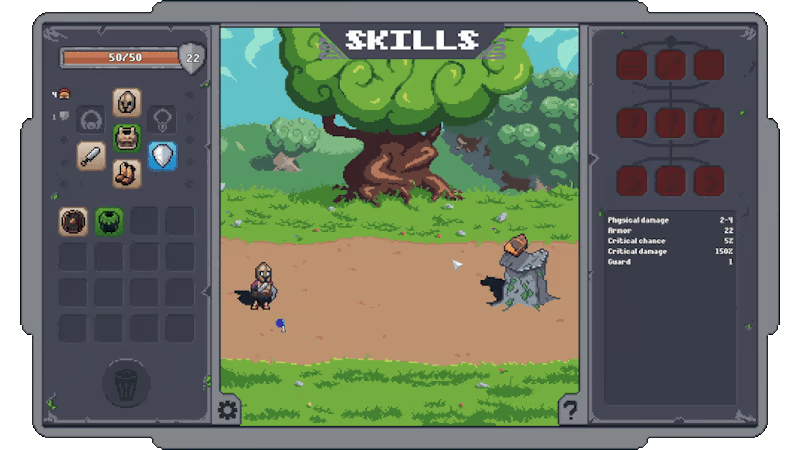
You will be able to acquire special skills from a tree that changes every game. Skills can offer you general utility, an increase in power or make one specific build go beyond its limits.

At the end of each region a boss will try to stop you from completing your quest. This powerful enemies have special abilities and will test your strength, so make the right choices at every step of your journey to make sure no one will stand in your way!
From the store page, unedited. May contain spoilers.
This release
Reviews and playtime
Very Positive
80% of 1,431
The game
Genres and features
How to install Overlooting
Pre-installed, so there is no setup wizard. Follow these in order.
- 01
Create a games folder
Make a folder like C:\Games\ and keep every game in it. Avoid Program Files, Downloads and the Desktop.
- 02
Exclude it from Windows Defender
Defender often deletes cracked files by mistake while they extract. Add C:\Games\ as an excluded folder:
Windows Security -> Virus & threat protection -> Manage settings -> Exclusions -> Add an exclusion -> Folder
- 03
Download into C:\Games\
Save the archive straight into that folder. This release is one 439.2 MB file.
- 04
Extract it there
Use 7-Zip or WinRAR. Keep about 966.2 MB free while it unpacks.
- One file
- Right-click it -> Extract here.
- Several parts
- Extract only part1 (or .001). The other parts are read automatically.
- 05
Open README.html
It is inside the extracted folder and explains how to start the game.
Still stuck? Read the install help
Download
Set up your games folder and the Defender exclusion before you extract. The Install tab has the steps.
VikingFile
The whole game in one file
FileQ
The whole game in one file
Pixeldrain
The whole game in one file
Pixeldrain slows free downloads to a few MB/s. The Copy fast link button gives you a bypass link with no speed limit. Paste it into your download manager, or into your browser's address bar.
Gofile (legacy)
The whole game in one file
We don't accept fix requests when only one host is down. Please use another mirror above. Links broken? Let us know.
We never password-protect files or hide installers. If a page asks for a password or payment, that is the host's ad, not us. See our safety guide.
System requirements
- Min
- Intel Core i3-3220
- Rec
- Intel Core i5-4690
- Min
- 2 GB RAM
- Rec
- 4 GB RAM
- Min
- NVIDIA GeForce GT 730 or AMD Radeon R7 240
- Rec
- NVIDIA GeForce GTX 660 or AMD Radeon R9 270
- Min
- 500 MB available space
- Rec
- 1 GB available space
Windows 10 or newer
These are the developer's listed requirements and may not be 100% accurate. If your specs fall below the minimum, try the game anyway; many games run fine below the listed requirements. When in doubt, check YouTube for performance benchmarks.