
PaperKlay
WhyKev2025Adventure, Platformer
1.4GBBuild 23900186Updated 76 days ago
About PaperKlay
A classic 3D platformer with a tactile twist: Open, unfold, and rotate your way through a stunning world built with familiar crafting materials. Featuring the talents of composer Kirkhope & Melin (Banjo-Kazooie, Yooka-Laylee) and voice actor Kevin Miller (Sly Cooper)


PaperKlay is a 3D platformer collect-a-thon where you open, unfold and rotate your way through a world made out of cardboard, paper, clay and other handcrafted materials.


Rotate and unfold the environment to progress. PaperKlay has plenty of collectibles and an exciting world to explore at your own pace!

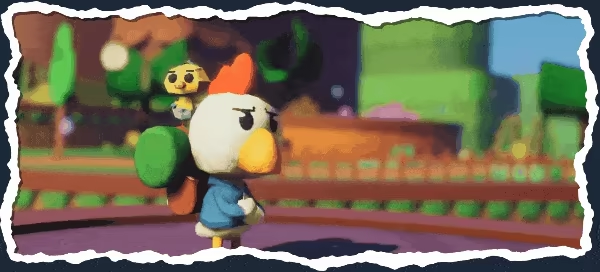
Join the duo Chick & Nugget on a creative adventure as they journey across a paper and cardboard filled world that will rotate and unfold your reality in order to save all of the lost eggs!


Meet a charming cast of craftspeople, from the cardboard scarecrows to the great Pinecone King with an all star voice cast you might know from Sly Cooper, Five Nights at Freddy's, Attack on Titan & more

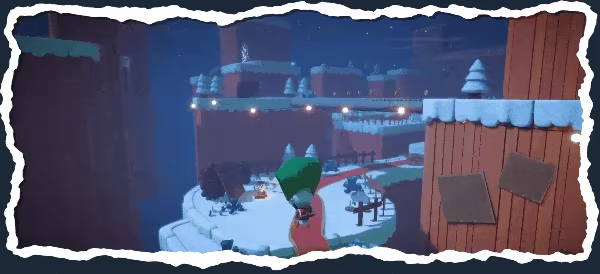
Master a variety of moves to explore the world! Double-jump, dash and sprint your way through levels, or use your glider to reach new heights. Your sidekick Nugget has his own unique way of solving puzzles, too!


PaperKlay features a catchy soundtrack with tracks from composers Grant Kirkhope (Banjo-Kazooie, Yooka-Laylee) and Steven Melin (Dark Dice, Moonlighter)

From the store page, unedited. May contain spoilers.
This release
Reviews and playtime
Very Positive
89% of 156
The game
Genres and features
How to install PaperKlay
Pre-installed, so there is no setup wizard. Follow these in order.
- 01
Create a games folder
Make a folder like C:\Games\ and keep every game in it. Avoid Program Files, Downloads and the Desktop.
- 02
Exclude it from Windows Defender
Defender often deletes cracked files by mistake while they extract. Add C:\Games\ as an excluded folder:
Windows Security -> Virus & threat protection -> Manage settings -> Exclusions -> Add an exclusion -> Folder
- 03
Download into C:\Games\
Save the archive straight into that folder. This release is one 1.4GB file.
- 04
Extract it there
Use 7-Zip or WinRAR. Keep about 3.1 GB free while it unpacks.
- One file
- Right-click it -> Extract here.
- Several parts
- Extract only part1 (or .001). The other parts are read automatically.
- 05
Open README.html
It is inside the extracted folder and explains how to start the game.
Still stuck? Read the install help
Download
Set up your games folder and the Defender exclusion before you extract. The Install tab has the steps.
FileDitch
The whole game in one file
FileQ
The whole game in one file
Pixeldrain
The whole game in one file
Pixeldrain slows free downloads to a few MB/s. The Copy fast link button gives you a bypass link with no speed limit. Paste it into your download manager, or into your browser's address bar.
Gofile (legacy)
The whole game in one file
We don't accept fix requests when only one host is down. Please use another mirror above. Links broken? Let us know.
We never password-protect files or hide installers. If a page asks for a password or payment, that is the host's ad, not us. See our safety guide.
System requirements
- Min
- Windows 7 or newer
- Min
- Intel Core i7-6700K 4.0GHz
- Min
- 8 GB RAM
- Min
- NVidia GTX 1060 / AMD RX 480
- Min
- Version 11
- Min
- 4 GB available space
- Min
- Windows Compatible Card
- Min
- A controller is recommended to play this game.
These are the developer's listed requirements and may not be 100% accurate. If your specs fall below the minimum, try the game anyway; many games run fine below the listed requirements. When in doubt, check YouTube for performance benchmarks.