Physical Layer
RaStar Studio2023Action, Indie
221.2MBBuild 10802154Updated 54 days ago
About Physical Layer
Physical Layer is a stylish, top-down shooter with cute, gun-toting characters. Utilize three powerful abilities to overcome a total of 240 stages, filled with a variety of enemies and challenges.
The enemy has activated the launch codes for a massive EMP weapon. Your orders are to gather the abort codes that are scattered throughout each of the enemy’s bases.
This will be a solo infiltration mission. Good luck.

Battle it out as a special agent disguised as a high school girl in this top-down shooter.
A variety of terrain types and enemies await you in each stage, called layers.
You will need lightning-fast reflexes and sound judgement to come up with the best solutions.
We’ll supply you with the necessary tools when you sneak in.
It’s up to you to make the most of them.
--Reverse Polarity--
When used, you will reverse the polarity of all bullets around you while reflecting nearby bullets.
This is the key to getting out of tricky situations, so use it wisely.
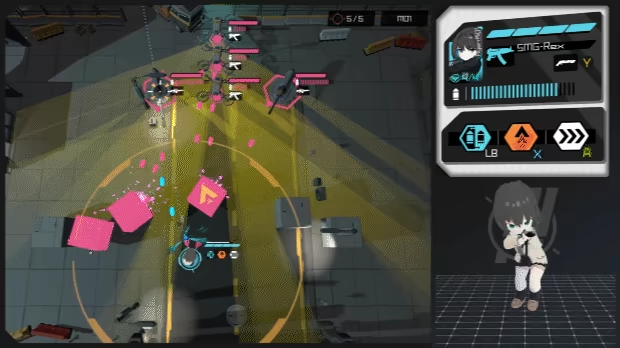
--Throw--
Lets you throw objects, kind of like telekinesis.
Use it to attack or take cover.

--Slide Dash--
Lets you dodge through enemy bullets at high speed.
This is a fantastic ability for both offense and defense, so make sure to time it right.

------Other Features------
Fashion
It's pretty bold of ya to be worrying about bling, when you should be focusing on blasting your enemies.
Alright, I'll let ya at 'em if you can prove your worth.

New Weapons
Weapons are, of course, a vital part of executing strategies.
When attempting a new layer, try testing out the provided weapons.

Additional Challenges
In Two-Shot and One-Shot modes, a single mistake can be fatal.
But if you can make it through these, then you must be the real McCoy. We have high hopes for you, kid.
From the store page, unedited. May contain spoilers.
This release
Reviews and playtime
Very Positive
90% of 77
The game
Genres and features
How to install Physical Layer
Pre-installed, so there is no setup wizard. Follow these in order.
- 01
Create a games folder
Make a folder like C:\Games\ and keep every game in it. Avoid Program Files, Downloads and the Desktop.
- 02
Exclude it from Windows Defender
Defender often deletes cracked files by mistake while they extract. Add C:\Games\ as an excluded folder:
Windows Security -> Virus & threat protection -> Manage settings -> Exclusions -> Add an exclusion -> Folder
- 03
Download into C:\Games\
Save the archive straight into that folder. This release is one 221.2MB file.
- 04
Extract it there
Use 7-Zip or WinRAR. Keep about 486.6 MB free while it unpacks.
- One file
- Right-click it -> Extract here.
- Several parts
- Extract only part1 (or .001). The other parts are read automatically.
- 05
Open README.html
It is inside the extracted folder and explains how to start the game.
Still stuck? Read the install help
Download
Set up your games folder and the Defender exclusion before you extract. The Install tab has the steps.
FileDitch
The whole game in one file
VikingFile
The whole game in one file
We don't accept fix requests when only one host is down. Please use another mirror above. Links broken? Let us know.
We never password-protect files or hide installers. If a page asks for a password or payment, that is the host's ad, not us. See our safety guide.
System requirements
- Min
- Windows10
- Rec
- -
- Min
- Intel Core i7-6650U
- Rec
- -
- Min
- 8 GB RAM
- Rec
- -
- Min
- 2 GB available space
- Rec
- -
These are the developer's listed requirements and may not be 100% accurate. If your specs fall below the minimum, try the game anyway; many games run fine below the listed requirements. When in doubt, check YouTube for performance benchmarks.