Pancake Studios2026Action, Platformer
301.8MBBuild 24938522Updated 95 days ago
About Sensory Overload
A dropper game designed to overwhelm your senses. Twisting tunnels, psychedelic patterns, and breathing walls assault your sense of balance as the chaos escalates with every level.
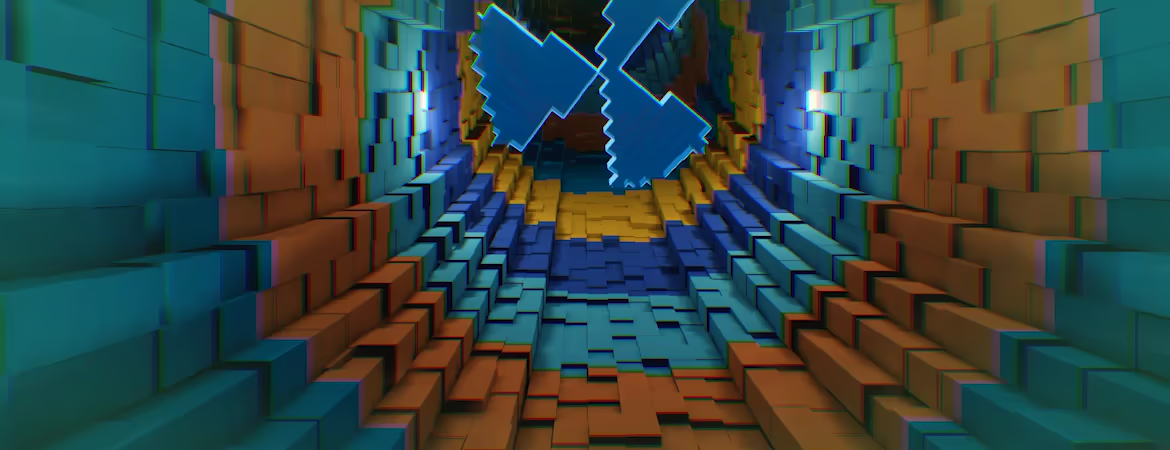
Prepare for a deliberate assault on your sense of balance. Sensory Overload is a dropper game where the environment itself is designed to fight you. Dodge obstacles while the walls breathe, the colors shift, and the world twists to drag your vision into a spiral.

Game Features
Stunning levels of escalating visual chaos
Dodge faster and faster with Ranked Mode.
Visual effects designed to disorient your senses
Levels named after what they'll do to you: Vertigo, Nausea, Peristalsis, Apocalypse...
Challenge yourself with the near-impossible final levels

Credits
Composer: Giorgio Satta
SoundFX: Tobias Haußmann, DSTRCT Group
UI: DSTRCT Group, Pancak3s
Backend dev: Green Eclipse
Game designer: Pancak3s
Special thanks go to the many playtesters and all the feedback given by players.
From the store page, unedited. May contain spoilers.
This release
Reviews and playtime
Very Positive
93% of 228
The game
Genres and features
How to install Sensory Overload
Pre-installed, so there is no setup wizard. Follow these in order.
- 01
Create a games folder
Make a folder like C:\Games\ and keep every game in it. Avoid Program Files, Downloads and the Desktop.
- 02
Exclude it from Windows Defender
Defender often deletes cracked files by mistake while they extract. Add C:\Games\ as an excluded folder:
Windows Security -> Virus & threat protection -> Manage settings -> Exclusions -> Add an exclusion -> Folder
- 03
Download into C:\Games\
Save the archive straight into that folder. This release is one 301.8MB file.
- 04
Extract it there
Use 7-Zip or WinRAR. Keep about 664.0 MB free while it unpacks.
- One file
- Right-click it -> Extract here.
- Several parts
- Extract only part1 (or .001). The other parts are read automatically.
- 05
Open README.html
It is inside the extracted folder and explains how to start the game.
Still stuck? Read the install help
Download
Set up your games folder and the Defender exclusion before you extract. The Install tab has the steps.
FileDitch
The whole game in one file
FileQ
The whole game in one file
Gofile (legacy)
The whole game in one file
We don't accept fix requests when only one host is down. Please use another mirror above. Links broken? Let us know.
We never password-protect files or hide installers. If a page asks for a password or payment, that is the host's ad, not us. See our safety guide.
System requirements
- Min
- Windows 10 64-bit
- Rec
- Windows 10 64-bit or Windows 11
- Min
- Quad-core 64-bit CPU, 2.5 GHz (e.g. Intel Core i5-6500 / AMD Ryzen 3 1200)
- Rec
- Quad-core 3.0 GHz (e.g. Intel Core i5-8400 / AMD Ryzen 5 2600)
- Min
- 1024 MB RAM
- Rec
- 2048 MB RAM
- Min
- GPU with Vulkan 1.0 support and 2 GB VRAM (e.g. NVIDIA GTX 750 Ti / AMD RX 460 / Intel Iris Xe)
- Rec
- Dedicated GPU with 4 GB VRAM and Vulkan 1.0 support (e.g. NVIDIA GTX 1060 / AMD RX 580)
- Min
- 64-bit only. Vulkan required, older cards may use Compatibility mode.
- Rec
- For higher visual quality and stable 60+ FPS at 1080p.
500 MB available space
Any
These are the developer's listed requirements and may not be 100% accurate. If your specs fall below the minimum, try the game anyway; many games run fine below the listed requirements. When in doubt, check YouTube for performance benchmarks.