
Somerville
Jumpship2022Adventure, Puzzle
3.4 GBBuild 11993672Updated 170 days ago
About Somerville
In the wake of catastrophe find the means to make your family whole again.

In the wake of catastrophe you must find the means to make your family whole again. Somerville is a Sci-Fi adventure grounded in the intimate repercussions of large scale conflict.

FAMILY
You embark on a journey to find the whereabouts of your family in the wake of an alien invasion.
THE INVASION
Live through the personal struggles of a young family separated in the final moments of a global conflict against a hostile alien civilisation. Discover first hand the full impact on others of this catastrophic event.
EXPLORE , LEARN , COMMUNICATE
Explore the devastation left behind by the invading alien force and those who resisted, learning more about their motives and methods the further you journey.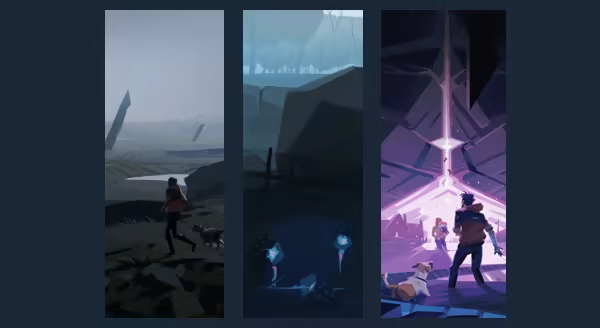
KEY FEATURES
- Solve the puzzles of an altered landscape drenched in alien sediment
- Flee, hide from or negotiate dangerous encounters
- Observe and learn form every alien entity
- Dig deep and find your way to multiple endings, their meaning and significance
JUMPSHIP
Jumpship is an independent game studio founded around an original IP by Chris Olsen built in collaboration with ex-CEO and co-founder of Playdead, Dino Patti. Our commitment is to deliver unique experiences that treat people with respect and help expand the definitions of interactive media.From the store page, unedited. May contain spoilers.
This release
Reviews and playtime
Mostly Positive
71% of 1,838
The game
Genres and features
How to install Somerville
Pre-installed, so there is no setup wizard. Follow these in order.
- 01
Create a games folder
Make a folder like C:\Games\ and keep every game in it. Avoid Program Files, Downloads and the Desktop.
- 02
Exclude it from Windows Defender
Defender often deletes cracked files by mistake while they extract. Add C:\Games\ as an excluded folder:
Windows Security -> Virus & threat protection -> Manage settings -> Exclusions -> Add an exclusion -> Folder
- 03
Download into C:\Games\
Save the archive straight into that folder. This release is one 3.4 GB file.
- 04
Extract it there
Use 7-Zip or WinRAR. Keep about 7.5 GB free while it unpacks.
- One file
- Right-click it -> Extract here.
- Several parts
- Extract only part1 (or .001). The other parts are read automatically.
- 05
Open README.html
It is inside the extracted folder and explains how to start the game.
Still stuck? Read the install help
Download
Set up your games folder and the Defender exclusion before you extract. The Install tab has the steps.
FileDitch
The whole game in one file
FileQ
The whole game in one file
Gofile (legacy)
The whole game in one file
We don't accept fix requests when only one host is down. Please use another mirror above. Links broken? Let us know.
We never password-protect files or hide installers. If a page asks for a password or payment, that is the host's ad, not us. See our safety guide.
System requirements
- Min
- Windows 8 (64-bit OS required)
- Rec
- Windows 10 (64-bit OS required)
- Min
- Intel Core 2 Quad Q6600 @ 2.4 GHz, AMD FX 8120 @ 3.1 GHz
- Rec
- Intel i7 920 @ 2.7 GHz, AMD Phenom II 945 @ 3.0 GHz
- Min
- 4 GB RAM
- Rec
- 8 GB RAM
- Min
- NVIDIA GT 630 / 650m, AMD Radeon HD6570 or equivalent
- Rec
- NVIDIA GTX 660, Radeon R9-270
- Min
- Version 11
- Rec
- -
- Min
- 12 GB available space
- Rec
- -
These are the developer's listed requirements and may not be 100% accurate. If your specs fall below the minimum, try the game anyway; many games run fine below the listed requirements. When in doubt, check YouTube for performance benchmarks.