
Starship Crafter
Rysesoft2026Simulation, Management
4.2GBBuild 26976306Updated 3 minutes ago
About Starship Crafter
Take on the role of a starship mechanic and pay off the immense debt your father left behind. Craft components, build starships, and take contracts from factions. Follow galactic events, and pay the debt before the deadline.
Take on the role of a starship mechanic and pay off the immense debt your father left behind. Craft components, build starships, and take contracts from factions. Follow events across the galaxy, and pay the debt before the deadline.


Start by salvaging broken items for parts, then craft them into basic components. Unlock more advanced components and new starship blueprints, then build ships of your own.


Take contracts from rival factions, racing pilots, desperate strangers, or big shots across the galaxy. Each job builds your reputation, pays toward the debt, and pulls you into their stories.


Pour your earnings back into the workshop. Upgrade workstations and unlock underground hangar floors to build, repair, patch, and replace broken parts on starships. Restore the workshop to its former glory.

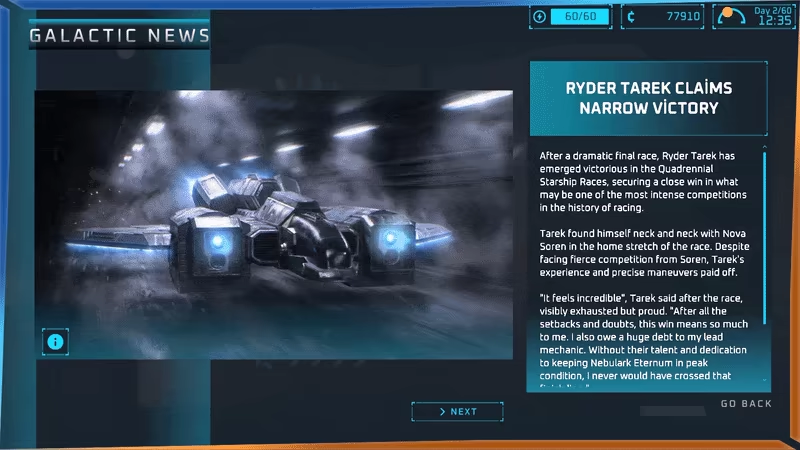
Uncover the truth behind your father's disappearance and the debt he left you. Earn the trust of rival factions, choose who to stand with, and shape how your story ends. All the while, a living galaxy moves around you, with elections, races, and conflicts unfolding in the news whether you take part or not.
From the store page, unedited. May contain spoilers.
This release
Reviews and playtime
Mixed
55% of 40
The game
Genres and features
How to install Starship Crafter
Pre-installed, so there is no setup wizard. Follow these in order.
- 01
Create a games folder
Make a folder like C:\Games\ and keep every game in it. Avoid Program Files, Downloads and the Desktop.
- 02
Exclude it from Windows Defender
Defender often deletes cracked files by mistake while they extract. Add C:\Games\ as an excluded folder:
Windows Security -> Virus & threat protection -> Manage settings -> Exclusions -> Add an exclusion -> Folder
- 03
Download into C:\Games\
Save the archive straight into that folder. This release is one 4.2GB file.
- 04
Extract it there
Use 7-Zip or WinRAR. Keep about 9.2 GB free while it unpacks.
- One file
- Right-click it -> Extract here.
- Several parts
- Extract only part1 (or .001). The other parts are read automatically.
- 05
Open README.html
It is inside the extracted folder and explains how to start the game.
Still stuck? Read the install help
Download
Set up your games folder and the Defender exclusion before you extract. The Install tab has the steps.
FilesYard
The whole game in one file
VikingFile
The whole game in one file
We don't accept fix requests when only one host is down. Please use another mirror above. Links broken? Let us know.
We never password-protect files or hide installers. If a page asks for a password or payment, that is the host's ad, not us. See our safety guide.
System requirements
- Min
- Intel Core i7-6700 / Ryzen 5 2600
- Rec
- Intel Core i5-10400 / AMD Ryzen 5 3600
- Min
- 8 GB RAM
- Rec
- 16 GB RAM
- Min
- GeForce GTX 1060 6GB / Radeon RX 580 8GB
- Rec
- GeForce RTX 2060 6GB / AMD RX 5700
Windows 10 64-bit
5 GB available space
DirectX compatible
These are the developer's listed requirements and may not be 100% accurate. If your specs fall below the minimum, try the game anyway; many games run fine below the listed requirements. When in doubt, check YouTube for performance benchmarks.