
The Last Cube
Improx Games2022Platformer, Puzzle
1.6GBBuild 20261249Updated 16 days ago
About The Last Cube
Cube puzzler and an epic adventure. Stamp stickers to the sides of your cube to imbue each surface with unique powers, which are vital to solving puzzles and finding secrets.
Roll into our Discord community
About the Game
Venture into the desolate cube world where you’ll discover 3D puzzles in diverse, colorful environments. As the Last Cube, you must prove your worth and save your dying home.Features:
- Award-winning puzzle gameplay, revolving around the unique “sticker system”
- Carefully crafted puzzles filled with surprises and delightful aha-moments
- Master familiar tools, while also enjoying the frequent introduction of fresh mechanics
- Explore a beautiful alien world, full of strange technology and rich lore
- Extra challenges in each level for great replayability
- Search for secrets! Find hidden lore and bonus puzzles!

Roll, dash, hop, clone - and more:
Solve puzzles the cube way: stamp stickers to your sides and use their special powers. New mechanics and abilities are frequently introduced, always surprising you with what your little cube is capable of!Exploration is rewarded:
Find secrets, complete extra challenges, and untangle the mystery of what brought your world to the brink of ruin. No matter the obstacle, your curious cube is determined to keep rolling.Varied, atmospheric environments:
The cube planet is an expansive world featuring a wide array of brutalist architecture that ranges from foggy nightmarish abysses, to oppressive lava lit factories, to uplifting natural landscapes full of golden rays of sunshine glistening against mountains. There’s a new surprise around every corner!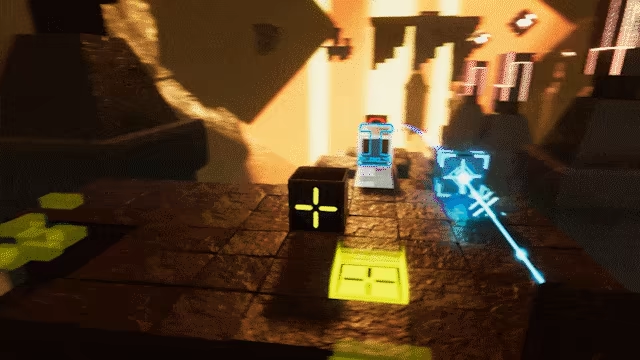
From the store page, unedited. May contain spoilers.
This release
Reviews and playtime
Very Positive
96% of 129
The game
Genres and features
How to install The Last Cube
Pre-installed, so there is no setup wizard. Follow these in order.
- 01
Create a games folder
Make a folder like C:\Games\ and keep every game in it. Avoid Program Files, Downloads and the Desktop.
- 02
Exclude it from Windows Defender
Defender often deletes cracked files by mistake while they extract. Add C:\Games\ as an excluded folder:
Windows Security -> Virus & threat protection -> Manage settings -> Exclusions -> Add an exclusion -> Folder
- 03
Download into C:\Games\
Save the archive straight into that folder. This release is one 1.6GB file.
- 04
Extract it there
Use 7-Zip or WinRAR. Keep about 3.5 GB free while it unpacks.
- One file
- Right-click it -> Extract here.
- Several parts
- Extract only part1 (or .001). The other parts are read automatically.
- 05
Open README.html
It is inside the extracted folder and explains how to start the game.
Still stuck? Read the install help
Download
Set up your games folder and the Defender exclusion before you extract. The Install tab has the steps.
FilesYard
The whole game in one file
FileDitch
The whole game in one file
VikingFile
The whole game in one file
We don't accept fix requests when only one host is down. Please use another mirror above. Links broken? Let us know.
We never password-protect files or hide installers. If a page asks for a password or payment, that is the host's ad, not us. See our safety guide.
System requirements
- Min
- Intel or AMD 2.20GHz Dual-Core
- Rec
- Intel or AMD 2.70GHz Quad-Core
- Min
- 4 GB RAM
- Rec
- 8 GB RAM
- Min
- DX10 Capable
- Rec
- Nvidia GTX 970 or AMD RX 570
Windows 10, 64 Bit
2 GB available space
These are the developer's listed requirements and may not be 100% accurate. If your specs fall below the minimum, try the game anyway; many games run fine below the listed requirements. When in doubt, check YouTube for performance benchmarks.