Pounce Light2024Sandbox, Casual
1.6 GBBuild 23216197Updated 146 days ago
About Tiny Glade
Tiny Glade is a small diorama builder where you doodle whimsical castles, cozy cottages & romantic ruins. Explore gridless building chemistry as the game adorns your glades with procedural detail. No management, combat or goals: just kick back and turn forgotten meadows into lovable dioramas.

Tiny Glade is a relaxing free-form building game. Tap into the joy of making something pretty with no management, no combat, or wrong answers - just kick back, doodle some castles, and turn forgotten meadows into lovable dioramas.


Explore gridless building chemistry, and watch the game carefully assemble every brick, pebble and plank, adapting to your whim. Draw a path through a building? A door pops up! Raise the building? Columns and beams line up to support it.

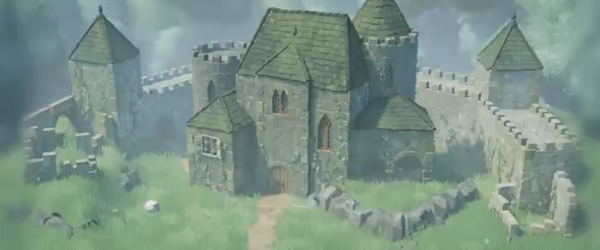
There are no wrong answers or failure states. You can change your mind at any time, and whatever you make will look cozy out of the box.


Let yourself unwind to the chill vibes, and escape into a world that feels alive. Ivy envelops your buildings, sheep waddle through your paths, and fireflies light up the night.
From the store page, unedited. May contain spoilers.
This release
Reviews and playtime
Overwhelmingly Positive
97% of 23,221
The game
Genres and features
How to install Tiny Glade
Pre-installed, so there is no setup wizard. Follow these in order.
- 01
Create a games folder
Make a folder like C:\Games\ and keep every game in it. Avoid Program Files, Downloads and the Desktop.
- 02
Exclude it from Windows Defender
Defender often deletes cracked files by mistake while they extract. Add C:\Games\ as an excluded folder:
Windows Security -> Virus & threat protection -> Manage settings -> Exclusions -> Add an exclusion -> Folder
- 03
Download into C:\Games\
Save the archive straight into that folder. This release is one 1.6 GB file.
- 04
Extract it there
Use 7-Zip or WinRAR. Keep about 3.6 GB free while it unpacks.
- One file
- Right-click it -> Extract here.
- Several parts
- Extract only part1 (or .001). The other parts are read automatically.
- 05
Open README.html
It is inside the extracted folder and explains how to start the game.
Still stuck? Read the install help
Download
Set up your games folder and the Defender exclusion before you extract. The Install tab has the steps.
FileDitch
The whole game in one file
Pixeldrain
The whole game in one file
Pixeldrain slows free downloads to a few MB/s. The Copy fast link button gives you a bypass link with no speed limit. Paste it into your download manager, or into your browser's address bar.
Gofile (legacy)
The whole game in one file
We don't accept fix requests when only one host is down. Please use another mirror above. Links broken? Let us know.
We never password-protect files or hide installers. If a page asks for a password or payment, that is the host's ad, not us. See our safety guide.
System requirements
- Min
- For 720p: A graphics card with Vulkan 1.2 support and 2+ GB of video memory: Radeon R9 270 (driver 21.3.1), GeForce GTX 670 (at least Kepler architecture, driver 472.12 or newer), Intel Iris Xe, or similar.
- Rec
- For 1080p: A graphics card with Vulkan 1.2 support and 4+ GB of video memory: Radeon RX 580, GeForce GTX 1060, Intel Arc A380, or similar.
- Min
- Yes, please
- Rec
- Absolutely
Windows 10+
Intel Core i5 or AMD Ryzen
4 GB RAM
3 GB available space
A mouse with 2 buttons + scroll wheel is necessary for camera control. ========================================= UNSUPPORTED graphics cards: laptop NVIDIA Kepler series, e.g. GeForce GT 740M, and older Intel HD Graphics series, e.g. 500, 4000, 5000, 6000.
These are the developer's listed requirements and may not be 100% accurate. If your specs fall below the minimum, try the game anyway; many games run fine below the listed requirements. When in doubt, check YouTube for performance benchmarks.