
Turquoise
Low Flame Studio2026Sandbox, Life Sim
116.2MBBuild 23509654Updated 31 days ago
About Turquoise
Turquoise is a Casual game developed by Low Flame Studio and published by Milkshake Games. It was released on Steam on 14 Apr, 2026. This game is no longer listed on the Steam store, so the original store description is not available.
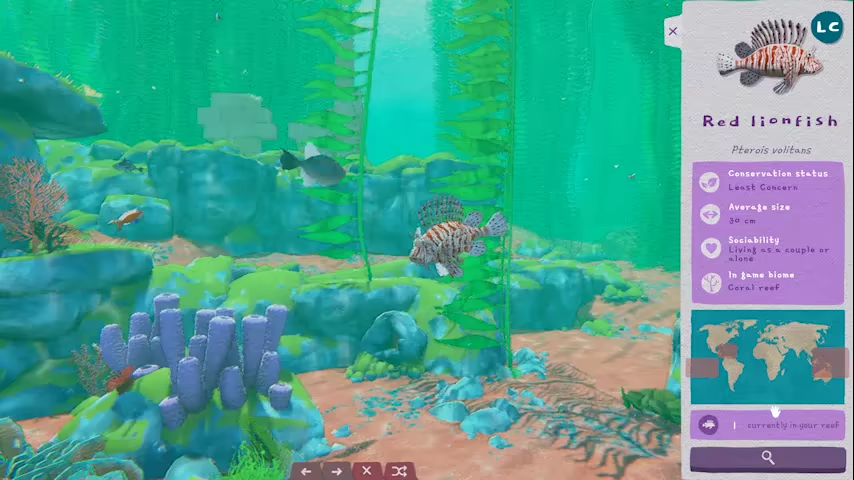

Welcome to Turquoise, a cozy collecting and building game that immerses you in the heart of a protected marine area. In this peaceful space, you’re free to imagine, decorate, and shape an environment where underwater life can flourish.


Design the seabed with an intuitive decoration editor: place rocks, corals, plants, and objects to create a harmonious habitat. Every detail matters to attract and welcome new marine species, each more fascinating than the last.
Build, observe, learn.
As you discover new fish and creatures, you unlock their entries in the built-in encyclopedia, where you can learn more about their behaviors, preferences, and origins.
A calm, educational, and inspiring experience.

Choose from 3 starting zones and build your own reef.
Use an intuitive decoration editor with more than 250 assets.
Collect over 50 fish and marine creatures.
Access an integrated encyclopedia to learn more about discovered species.
Enjoy a relaxing and contemplative atmosphere. Care for your corner of the ocean, watch it evolve, and let marine magic unfold.
Observe wildlife thriving in the environment you’ve created.
2 game modes: Discovery and Sandbox.
From the store page, unedited. May contain spoilers.
This release
Reviews and playtime
Positive
96% of 23
The game
Genres and features
How to install Turquoise
Pre-installed, so there is no setup wizard. Follow these in order.
- 01
Create a games folder
Make a folder like C:\Games\ and keep every game in it. Avoid Program Files, Downloads and the Desktop.
- 02
Exclude it from Windows Defender
Defender often deletes cracked files by mistake while they extract. Add C:\Games\ as an excluded folder:
Windows Security -> Virus & threat protection -> Manage settings -> Exclusions -> Add an exclusion -> Folder
- 03
Download into C:\Games\
Save the archive straight into that folder. This release is one 116.2MB file.
- 04
Extract it there
Use 7-Zip or WinRAR. Keep about 255.6 MB free while it unpacks.
- One file
- Right-click it -> Extract here.
- Several parts
- Extract only part1 (or .001). The other parts are read automatically.
- 05
Open README.html
It is inside the extracted folder and explains how to start the game.
Still stuck? Read the install help
Download
Set up your games folder and the Defender exclusion before you extract. The Install tab has the steps.
FilesYard
The whole game in one file
FileDitch
The whole game in one file
VikingFile
The whole game in one file
We don't accept fix requests when only one host is down. Please use another mirror above. Links broken? Let us know.
We never password-protect files or hide installers. If a page asks for a password or payment, that is the host's ad, not us. See our safety guide.
System requirements
- Min
- Windows 10 or later
- Min
- Intel Core i3 2.00 GHz or AMD equivalent
- Min
- 2 GB RAM
- Min
- Nvidia GeForce GTX950 or higher
- Min
- 500 MB available space
- Min
- Have one.
These are the developer's listed requirements and may not be 100% accurate. If your specs fall below the minimum, try the game anyway; many games run fine below the listed requirements. When in doubt, check YouTube for performance benchmarks.