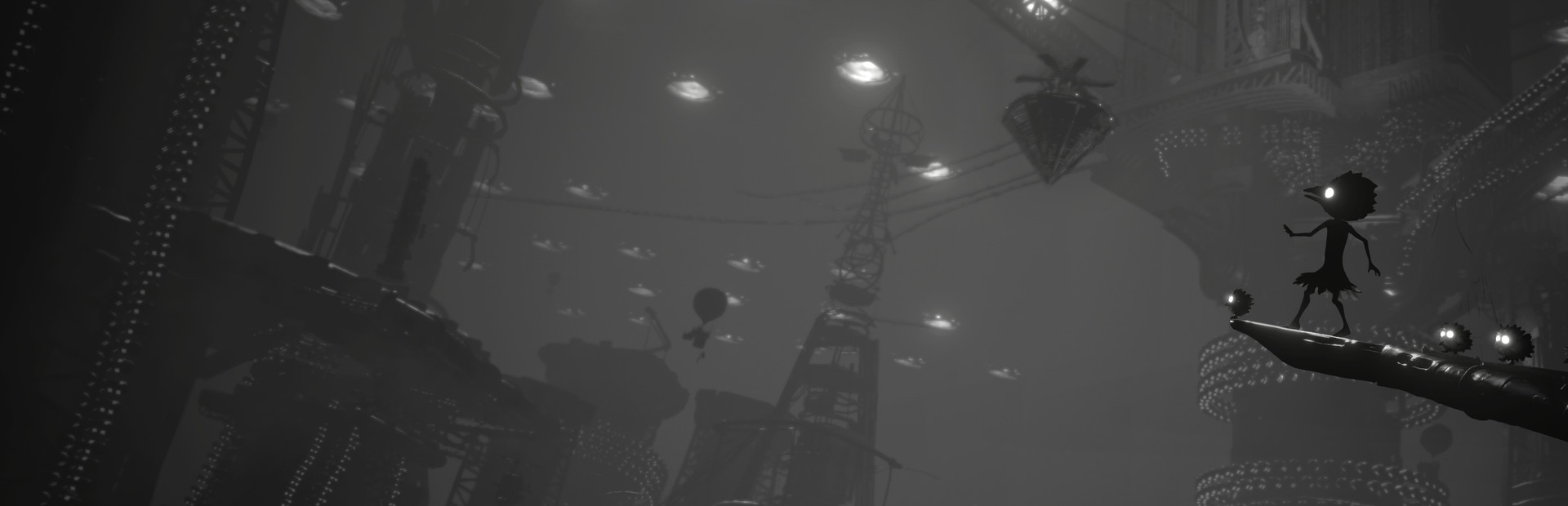
White Shadows
Monokel2021Puzzle, Adventure
2.2GBBuild 20765600Updated 29 days ago
About White Shadows
The wolves are watching! Venture through a captivating but brutal dystopia where our young adventurer Ravengirl will travel through this huge city’s brightest highs and delve to its darkest depths on her perilous journey of discovery and finding her destiny where hope seems in short supply.

White Shadows is a cinematic puzzle-platformer where you play as a little Ravengirl trying to escape a brutal dystopia founded on oppression and violence that puts her at the bottom of its hierarchical social ladder.

Composed of a vast network of towers rising from the void of post-catastrophe darkness into the sky above, the city our young adventurer seeks to escape is a dangerous place to be. She will have to find ways to avoid the teeth of machinery primed to grind her into dust, leap across rickety infrastructure that bridges the cavernous darkness all around and avoid the watchful eyes of guards ready to gun her down. She will travel to the city’s brightest highs and delve to its darkest depths on her journey, discovering her destiny among the last free people alive.

White Shadows’ striking architectural forms and stunning monochrome art style combine to create a place steeped in atmosphere. It’s a world where the lies of the elite are plastered across its walls, where twisted forms of entertainment are used to keep everyone in their place, and where hope seems in short supply.


- A visually stunning and narratively rich dystopian setting with a distinctive art style
- Varied puzzle platforming with unique scenarios that keep things fresh
- An exciting personal story combined with social critique
- A simple and intuitive control scheme
From the store page, unedited. May contain spoilers.
This release
Reviews and playtime
Very Positive
81% of 1,949
The game
Genres and features


How to install White Shadows
Pre-installed, so there is no setup wizard. Follow these in order.
- 01
Create a games folder
Make a folder like C:\Games\ and keep every game in it. Avoid Program Files, Downloads and the Desktop.
- 02
Exclude it from Windows Defender
Defender often deletes cracked files by mistake while they extract. Add C:\Games\ as an excluded folder:
Windows Security -> Virus & threat protection -> Manage settings -> Exclusions -> Add an exclusion -> Folder
- 03
Download into C:\Games\
Save the archive straight into that folder. This release is one 2.2GB file.
- 04
Extract it there
Use 7-Zip or WinRAR. Keep about 4.8 GB free while it unpacks.
- One file
- Right-click it -> Extract here.
- Several parts
- Extract only part1 (or .001). The other parts are read automatically.
- 05
Open README.html
It is inside the extracted folder and explains how to start the game.
Still stuck? Read the install help
Download
Set up your games folder and the Defender exclusion before you extract. The Install tab has the steps.
FilesYard
The whole game in one file
FileDitch
The whole game in one file
VikingFile
The whole game in one file
We don't accept fix requests when only one host is down. Please use another mirror above. Links broken? Let us know.
We never password-protect files or hide installers. If a page asks for a password or payment, that is the host's ad, not us. See our safety guide.
System requirements
- Min
- Core i5-6500 | Ryzen 5 1600
- Rec
- Core i5-7600 | Ryzen 5 3600
- Min
- NVIDIA GTX 960 | AMD R9 380
- Rec
- NVIDIA GTX 1660 | AMD RX Vega-56
Windows 10
8 GB RAM
6 GB available space
These are the developer's listed requirements and may not be 100% accurate. If your specs fall below the minimum, try the game anyway; many games run fine below the listed requirements. When in doubt, check YouTube for performance benchmarks.