doekuramori2025Shooter, Action
1.3GBBuild 19683099Updated 86 days ago
About Beyond Citadel
Beyond Citadel is an anime style retro throwback shooter inspired by the classics of the 90's, with realistic gunplay mechanics, anime violence and fast paced combat. Fight your way through the heavily armed mechanical fortress and discover the secret that lies beneath.
The Citadel, the last stronghold of mankind's resistance against the Apocalypse, has fallen. Humankind is now under the control of the Trumpeters of the Apocalypse, the leaders of the forces of the Apocalypse. The “Martyr” who is the last resort of the Seven Angels, the guardians of humankind, is led by a mysterious signal and sets out on a journey to overthrow the Trumpeters of the Apocalypse.
To find the truth behind the signal, buried under the Citadel.

Beyond Citadel is a single-player FPS inspired by the FPS classics of the 90’s, featuring anime style 2.5D graphics and realistic gunplay mechanics.
◆Various weapons of realistic gunplay

・From black powder firearms to futuristic energy weapons.
・Each weapon requires different handling.
・Conditions of the weapons decrease on firing and sometimes they can be jammed.
◆Various locations and tough opponents

・Explore the fortress and acquire new skill
・In-door and out-door hand-crafted levels
・From foot soldiers to armored vehicles… and horrific hostile creatures!
◆Atmospheric world and unique characters
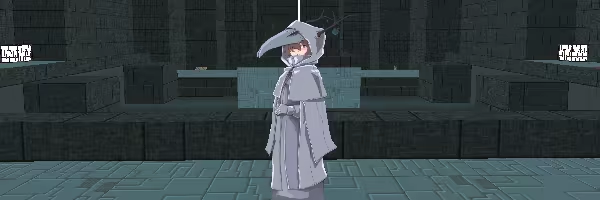
・You are not alone. Your allies will aid you on your journey.
・Intense destructive effects color the dark futuric world.
Overthrow the Trumpeters and cancel the Apocalypse.
The world is relying on you…
From the store page, unedited. May contain spoilers.
This release
Reviews and playtime
Overwhelmingly Positive
96% of 4,584
The game
Genres and features
How to install Beyond Citadel
Pre-installed, so there is no setup wizard. Follow these in order.
- 01
Create a games folder
Make a folder like C:\Games\ and keep every game in it. Avoid Program Files, Downloads and the Desktop.
- 02
Exclude it from Windows Defender
Defender often deletes cracked files by mistake while they extract. Add C:\Games\ as an excluded folder:
Windows Security -> Virus & threat protection -> Manage settings -> Exclusions -> Add an exclusion -> Folder
- 03
Download into C:\Games\
Save the archive straight into that folder. This release is one 1.3GB file.
- 04
Extract it there
Use 7-Zip or WinRAR. Keep about 2.9 GB free while it unpacks.
- One file
- Right-click it -> Extract here.
- Several parts
- Extract only part1 (or .001). The other parts are read automatically.
- 05
Open README.html
It is inside the extracted folder and explains how to start the game.
Still stuck? Read the install help
Download
Set up your games folder and the Defender exclusion before you extract. The Install tab has the steps.
FileDitch
The whole game in one file
FileQ
The whole game in one file
Pixeldrain
The whole game in one file
Pixeldrain slows free downloads to a few MB/s. The Copy fast link button gives you a bypass link with no speed limit. Paste it into your download manager, or into your browser's address bar.
Gofile (legacy)
The whole game in one file
We don't accept fix requests when only one host is down. Please use another mirror above. Links broken? Let us know.
We never password-protect files or hide installers. If a page asks for a password or payment, that is the host's ad, not us. See our safety guide.