Pavel Ševeček2025Simulation
266.1 MBBuild 22871392Updated 160 days ago
About SpaceSim
Simulation & rendering software that uses Smoothed Particle Hydrodynamics (SPH) to simulate collisions of celestial bodies, accretion disks around black holes, or formation of galaxies in the early universe.
SpaceSim is a particle-based simulation and rendering software, primarily focused on astrophysical applications.
Important!
This is a non-realtime simulator. Although low-resolution simulations are fast enough to be real-time, simulations with millions of particles can take several hours to finish.
This is not a game. It does not contain any game mechanics, progression, sandbox elements, etc. Please do not expect any gaming experience.
The goal of the project is to "de-mystify" scientific simulations and make them accessible to the general public. SpaceSim uses the same approach (albeit simplified and at lower resolution) as the research simulations typically run on supercomputers, but it can run on your desktop PC or laptop, comes with an intuitive user interface, and requires no extensive knowledge of mathematics, physics, or programming.
You can recreate some of the well-known simulations from the scientific literature, such as the Moon-forming impact, the formation of the ring system of Saturn, or the DART kinetic impactor. Or you can simply explore various initial conditions, both grounded and realistic, but also hypothetical "what-if" scenarios, such as the collision of two planets made of matter and anti-matter.
Fluid dynamics and gravitation
Each deformable object in the simulation is discretized into particles that interact with each other through collisions (by solving the Navier-Stokes equations) and gravitational attraction. Objects can also be rigid (non-deformable) - they retain their shape, which simplifies collisions between objects and optimizes simulation speed.
The particle-based solver is useful for simulating a number of astrophysical events, such as the formation of planets from protoplanetary disks or the mutual interaction of galaxies.
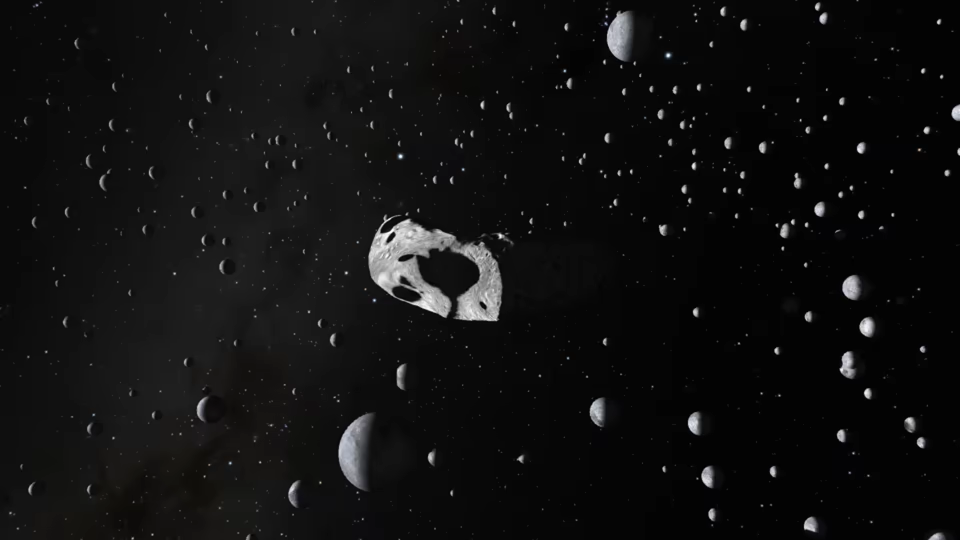
Object customization
The application has a number of object types - planets, stars, asteroids, disks, clouds, galaxies, and more. Each object has adjustable parameters that allow you to change its geometry, materials, appearance, and simulation behavior. The surface textures of planets and asteroids can be further tailored using procedural generation or by uploading custom images.
Or, if you need even more control, create your own objects using the Lua scripting language.

Black holes (and white holes)
The renderer includes the effect of gravitational lensing, bending the light rays that pass close to a black hole and creating realistic renderings of warped accretion disks, duplicated images of objects behind black holes (including other black holes) or Einstein rings of galaxies.

Particle colors and gravity visualization
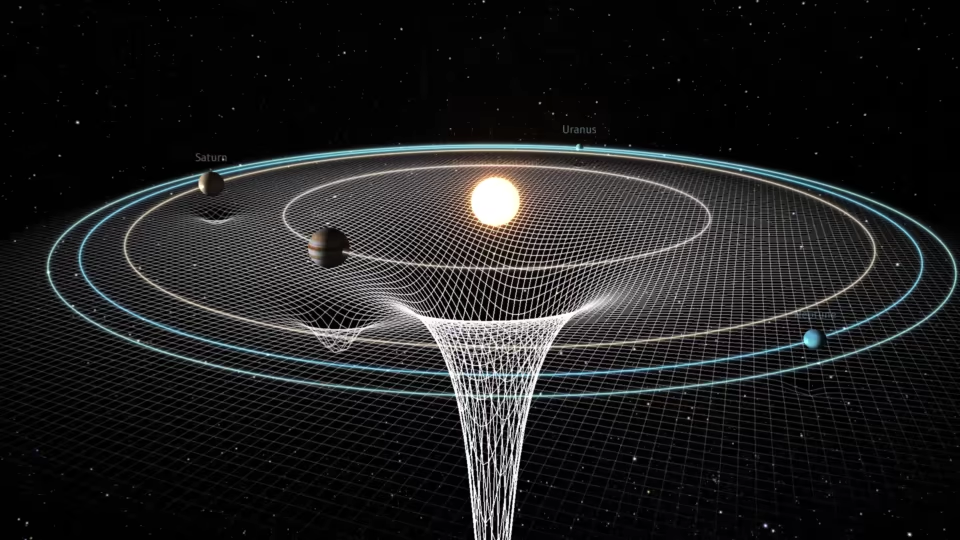
SpaceSim provides additional insights into the simulation in a number of ways. It can color particles based on values of a specific quantity (velocity, pressure, material, ...), show the Roche limit indicating where satellites can have stable orbits, or draw the potential field to see the gravity wells around celestial bodies.
Key features:
CPU and GPU simulation solver
Optimized gravity simulation using the Barnes-Hut algorithm
Simulation history - store the entire simulation and replay it later
Two render engines - Real-time or Raymarcher
Customizable camera paths with object tracking
Lua scripting for custom objects and simulation systems
Built-in video recording (H.264 codec) and various export options (Alembic, OpenVDB)
From the store page, unedited. May contain spoilers.
This release
Reviews and playtime
Very Positive
95% of 314
The game
Genres and features
How to install SpaceSim
Pre-installed, so there is no setup wizard. Follow these in order.
- 01
Create a games folder
Make a folder like C:\Games\ and keep every game in it. Avoid Program Files, Downloads and the Desktop.
- 02
Exclude it from Windows Defender
Defender often deletes cracked files by mistake while they extract. Add C:\Games\ as an excluded folder:
Windows Security -> Virus & threat protection -> Manage settings -> Exclusions -> Add an exclusion -> Folder
- 03
Download into C:\Games\
Save the archive straight into that folder. This release is one 266.1 MB file.
- 04
Extract it there
Use 7-Zip or WinRAR. Keep about 585.3 MB free while it unpacks.
- One file
- Right-click it -> Extract here.
- Several parts
- Extract only part1 (or .001). The other parts are read automatically.
- 05
Open README.html
It is inside the extracted folder and explains how to start the game.
Still stuck? Read the install help
Download
Set up your games folder and the Defender exclusion before you extract. The Install tab has the steps.
FileDitch
The whole game in one file
FileQ
The whole game in one file
Pixeldrain
The whole game in one file
Pixeldrain slows free downloads to a few MB/s. The Copy fast link button gives you a bypass link with no speed limit. Paste it into your download manager, or into your browser's address bar.
Gofile (legacy)
The whole game in one file
We don't accept fix requests when only one host is down. Please use another mirror above. Links broken? Let us know.
We never password-protect files or hide installers. If a page asks for a password or payment, that is the host's ad, not us. See our safety guide.
System requirements
- Min
- Windows 10
- Rec
- Windows 10 or 11
- Min
- 4 GB RAM
- Rec
- 16 GB RAM
- Min
- GPU supporting OpenGL 4.6
- Rec
- GPU supporting OpenGL 4.6 with 4 GB VRAM
- Min
- 500 MB available space
- Rec
- 10 GB available space
- Min
- -
- Rec
- CPU determines how fast the simulation can run. Generally, more cores = more speed.
CPU supporting SSE 4.1
These are the developer's listed requirements and may not be 100% accurate. If your specs fall below the minimum, try the game anyway; many games run fine below the listed requirements. When in doubt, check YouTube for performance benchmarks.