Donut County
Ben Esposito2018Casual, Indie
353.0MBBuild 20230777Updated 30 days ago
About Donut County
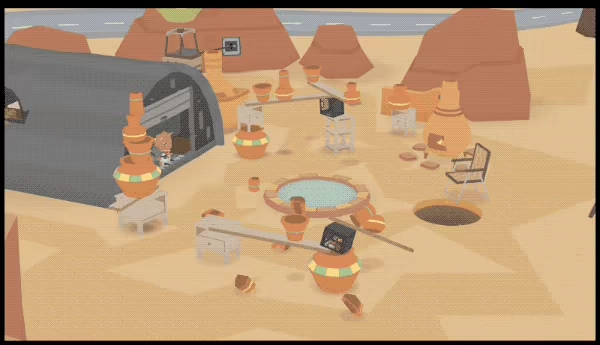
Donut County is a story-based physics puzzle game where you play as an ever-growing hole in the ground. Meet cute characters, steal their trash, and throw them in a hole.
Where Trash is Treasure
Raccoons have taken over Donut County with remote-controlled trash-stealing holes. You play as BK, a hole-driving raccoon who swallows up his friends and their homes to earn idiotic prizes.
When BK falls into one of his own holes, he’s confronted by his best friend Mira and the residents of Donut County, who are all stuck 999 feet underground… and they demand answers!

The Hole Keeps Growing
• EXPLORE every character’s home, each with their own unique environment.
• MOVE the hole to swallow up their stuff, growing bigger each time.
• COMBINE objects inside for crazy effects: cook soup, breed bunnies, launch fireworks, and more.
• CATAPULT things back out of the hole. You can use it to solve puzzles...or just destroy stuff.
• DEVOUR everything. The hole won’t stop until the whole county is all gone.

Donut County was created by Ben Esposito, designer on What Remains of Edith Finch and The Unfinished Swan. It is the result of six years of solo development, dozens of donuts (for research), and one fateful encounter with a raccoon.
From the store page, unedited. May contain spoilers.
This release
Reviews and playtime
Very Positive
92% of 11,203
The game
Genres and features


How to install Donut County
Pre-installed, so there is no setup wizard. Follow these in order.
- 01
Create a games folder
Make a folder like C:\Games\ and keep every game in it. Avoid Program Files, Downloads and the Desktop.
- 02
Exclude it from Windows Defender
Defender often deletes cracked files by mistake while they extract. Add C:\Games\ as an excluded folder:
Windows Security -> Virus & threat protection -> Manage settings -> Exclusions -> Add an exclusion -> Folder
- 03
Download into C:\Games\
Save the archive straight into that folder. This release is one 353.0MB file.
- 04
Extract it there
Use 7-Zip or WinRAR. Keep about 776.6 MB free while it unpacks.
- One file
- Right-click it -> Extract here.
- Several parts
- Extract only part1 (or .001). The other parts are read automatically.
- 05
Open README.html
It is inside the extracted folder and explains how to start the game.
Still stuck? Read the install help
Download
Set up your games folder and the Defender exclusion before you extract. The Install tab has the steps.
FilesYard
The whole game in one file
FileDitch
The whole game in one file
VikingFile
The whole game in one file
We don't accept fix requests when only one host is down. Please use another mirror above. Links broken? Let us know.
We never password-protect files or hide installers. If a page asks for a password or payment, that is the host's ad, not us. See our safety guide.
System requirements
- Min
- Intel Core2 Duo E8400
- Rec
- Intel Core i3-4170 or better
- Min
- 2 GB RAM
- Rec
- 4 GB RAM
- Min
- Radeon HD 3870
- Rec
- Nvidia GeForce GT 640 or better
- Min
- Version 9.0c
- Rec
- Version 11
- Min
- 500 MB available space
- Rec
- 1 GB available space
Windows 10
These are the developer's listed requirements and may not be 100% accurate. If your specs fall below the minimum, try the game anyway; many games run fine below the listed requirements. When in doubt, check YouTube for performance benchmarks.