
Gorogoa
Buried Signal2017Puzzle, Indie
713.9MBBuild 20230791Updated 23 days ago
About Gorogoa
Gorogoa is an elegant evolution of the puzzle genre, told through a beautifully hand-drawn story designed and illustrated by Jason Roberts. Winner of Debut Game at the 2018 BAFTA Games Awards, as well as Best Mobile Game and the Innovation Award at the GDC 2018 Choice Awards.

UNIQUELY IMAGINATIVE PUZZLES
The gameplay of Gorogoa is wholly original, comprised of lavishly illustrated panels that players arrange and combine in imaginative ways to solve puzzles. Impeccably simple, yet satisfyingly complex.

GORGEOUSLY HAND-DRAWN GAMEPLAY
Jason Roberts created thousands of meticulously detailed hand-drawn illustrations, encompassing the impressive scope of Gorogoa's personal narrative.
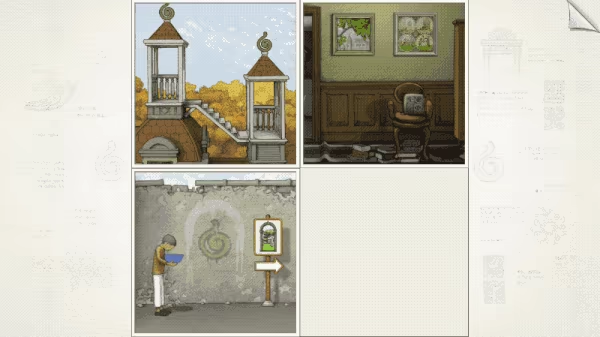
A NEW KIND OF STORYTELLING
Gorogoa isn't just a game - it's a work of art, expressing itself through soulful, charming illustrations and distinguished puzzle mechanics.

From the store page, unedited. May contain spoilers.
This release
Reviews and playtime
Overwhelmingly Positive
97% of 19,478
The game
Genres and features

How to install Gorogoa
Pre-installed, so there is no setup wizard. Follow these in order.
- 01
Create a games folder
Make a folder like C:\Games\ and keep every game in it. Avoid Program Files, Downloads and the Desktop.
- 02
Exclude it from Windows Defender
Defender often deletes cracked files by mistake while they extract. Add C:\Games\ as an excluded folder:
Windows Security -> Virus & threat protection -> Manage settings -> Exclusions -> Add an exclusion -> Folder
- 03
Download into C:\Games\
Save the archive straight into that folder. This release is one 713.9MB file.
- 04
Extract it there
Use 7-Zip or WinRAR. Keep about 1.5 GB free while it unpacks.
- One file
- Right-click it -> Extract here.
- Several parts
- Extract only part1 (or .001). The other parts are read automatically.
- 05
Open README.html
It is inside the extracted folder and explains how to start the game.
Still stuck? Read the install help
Download
Set up your games folder and the Defender exclusion before you extract. The Install tab has the steps.
FilesYard
The whole game in one file
FileDitch
The whole game in one file
VikingFile
The whole game in one file
We don't accept fix requests when only one host is down. Please use another mirror above. Links broken? Let us know.
We never password-protect files or hide installers. If a page asks for a password or payment, that is the host's ad, not us. See our safety guide.
System requirements
- Min
- Windows 10
- Min
- 1 GHz
- Min
- 512 MB RAM
- Min
- GeForce 6 or Radeon X1000
- Min
- Version 9.0c
- Min
- 680 MB available space
These are the developer's listed requirements and may not be 100% accurate. If your specs fall below the minimum, try the game anyway; many games run fine below the listed requirements. When in doubt, check YouTube for performance benchmarks.