
Wanderstop
Ivy Road2025Adventure, Simulation
5.4 GBBuild 18352510Updated 152 days ago
About Wanderstop
From the creator of The Stanley Parable and The Beginner’s Guide comes Wanderstop, a narrative-centric cozy game about change and tea.

Wanderstop is a tea shop management ritual. Grow and harvest the ingredients needed for tea, and then mix them together in an unusual tea-making contraption. Along the way, speak with the many travelers who pass through the shop, learn their stories and make tea that’s just right for them.

In your downtime, you might tidy up around the clearing, decorate the shop in your style, or just sit on a bench with a cup of tea and listen to your own thoughts. Maybe doing nothing at all is okay. The shop demands patience, it rejects those who have come only in the pursuit of growth unchecked.
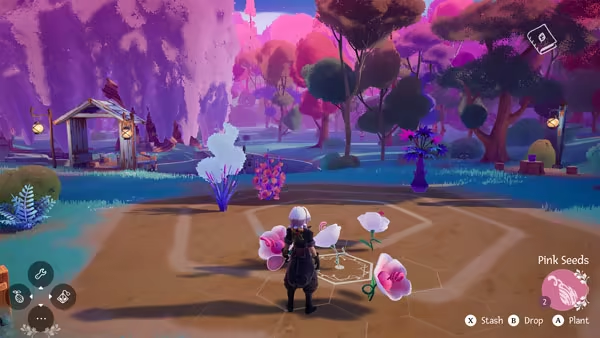
And that’s why Alta can’t be here. It’s why she’ll never make it. This isn’t who she is. No, she’s a fighter! Why would anyone insist on turning the world’s greatest championship warrior into a docile shopkeeper?! With everything she’s capable of?? No no no, she won’t, she won’t do it... she can’t…
Wanderstop is a game from the team at Ivy Road, including Davey Wreden (creator of The Stanley Parable and The Beginner’s Guide), Karla Zimonja (co-creator of Gone Home and Tacoma) and Daniel “C418” Rosenfeld (the music of Minecraft).
From the store page, unedited. May contain spoilers.
This release
Reviews and playtime
Very Positive
92% of 3,022
The game
Genres and features


How to install Wanderstop
Pre-installed, so there is no setup wizard. Follow these in order.
- 01
Create a games folder
Make a folder like C:\Games\ and keep every game in it. Avoid Program Files, Downloads and the Desktop.
- 02
Exclude it from Windows Defender
Defender often deletes cracked files by mistake while they extract. Add C:\Games\ as an excluded folder:
Windows Security -> Virus & threat protection -> Manage settings -> Exclusions -> Add an exclusion -> Folder
- 03
Download into C:\Games\
Save the archive straight into that folder. This release is one 5.4 GB file.
- 04
Extract it there
Use 7-Zip or WinRAR. Keep about 11.9 GB free while it unpacks.
- One file
- Right-click it -> Extract here.
- Several parts
- Extract only part1 (or .001). The other parts are read automatically.
- 05
Open README.html
It is inside the extracted folder and explains how to start the game.
Still stuck? Read the install help
Download
Set up your games folder and the Defender exclusion before you extract. The Install tab has the steps.
FileDitch
The whole game in one file
FileQ
The whole game in one file
Pixeldrain
The whole game in one file
Pixeldrain slows free downloads to a few MB/s. The Copy fast link button gives you a bypass link with no speed limit. Paste it into your download manager, or into your browser's address bar.
Gofile (legacy)
The whole game in one file
We don't accept fix requests when only one host is down. Please use another mirror above. Links broken? Let us know.
We never password-protect files or hide installers. If a page asks for a password or payment, that is the host's ad, not us. See our safety guide.
System requirements
- Min
- Intel Core i5-750 or AMD Phenom II X2 565
- Rec
- Intel Core i5-4570 or AMD Ryzen 3 1300x
- Min
- NVIDIA GeForce GT 1030, 2GB or AMD Radeon R7 370, 2GB or Intel Arc A310, 4GB
- Rec
- NVIDIA GeForce GTX 970, 4GB or AMD Radeon RX 480, 4GB or Intel Arc A580, 8GB
- Min
- Low 720p @ 30 FPS
- Rec
- High 1080 @ 60 FPS
Windows 10
8 GB RAM
Version 11
15 GB available space
These are the developer's listed requirements and may not be 100% accurate. If your specs fall below the minimum, try the game anyway; many games run fine below the listed requirements. When in doubt, check YouTube for performance benchmarks.